TechE.Works
Login

Start a conversation

TechE.Works

AI-Powered Turnkey Tech for SMBs and MSME Transformation

One Governed Business System for work, apps, files, workflows, approved AI, support and recovery.
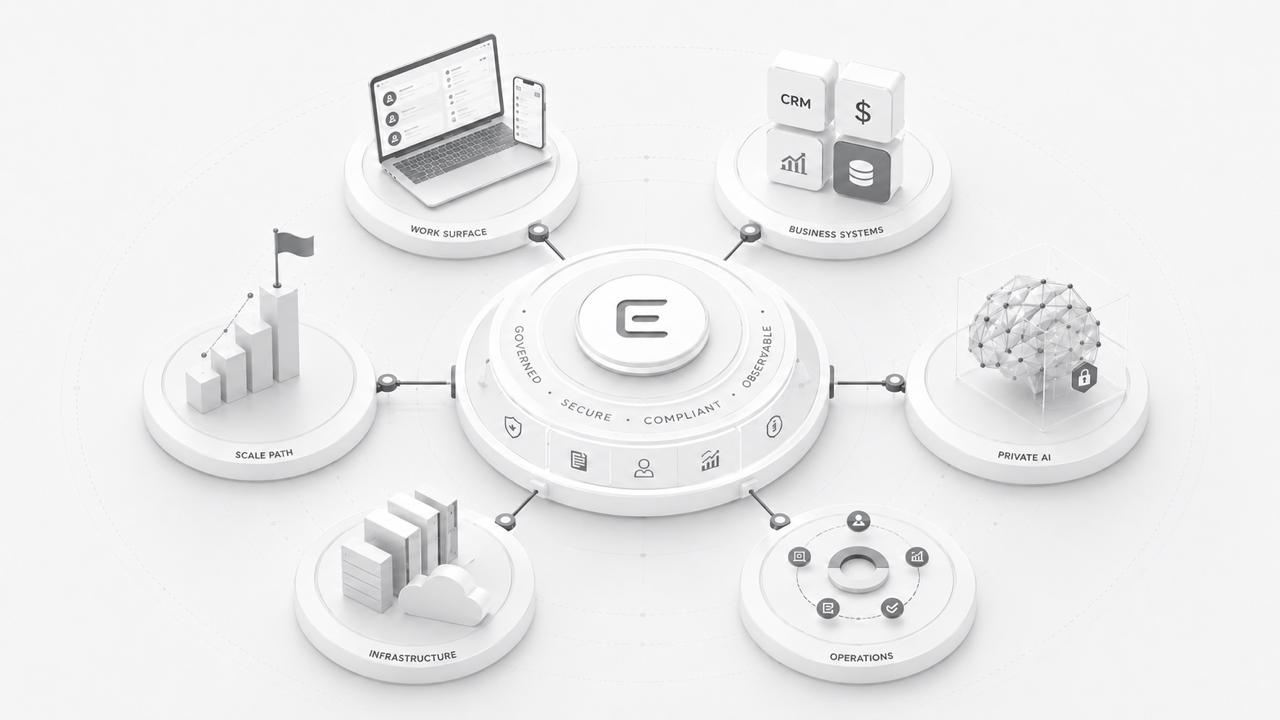
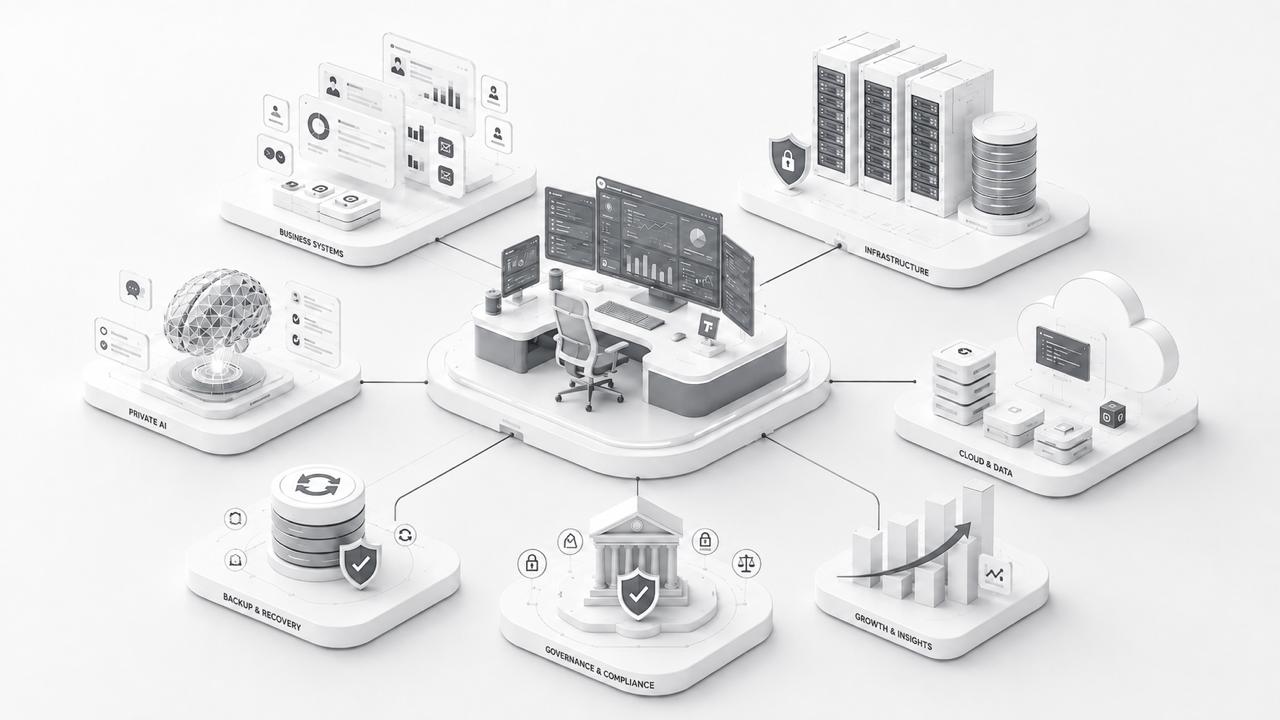
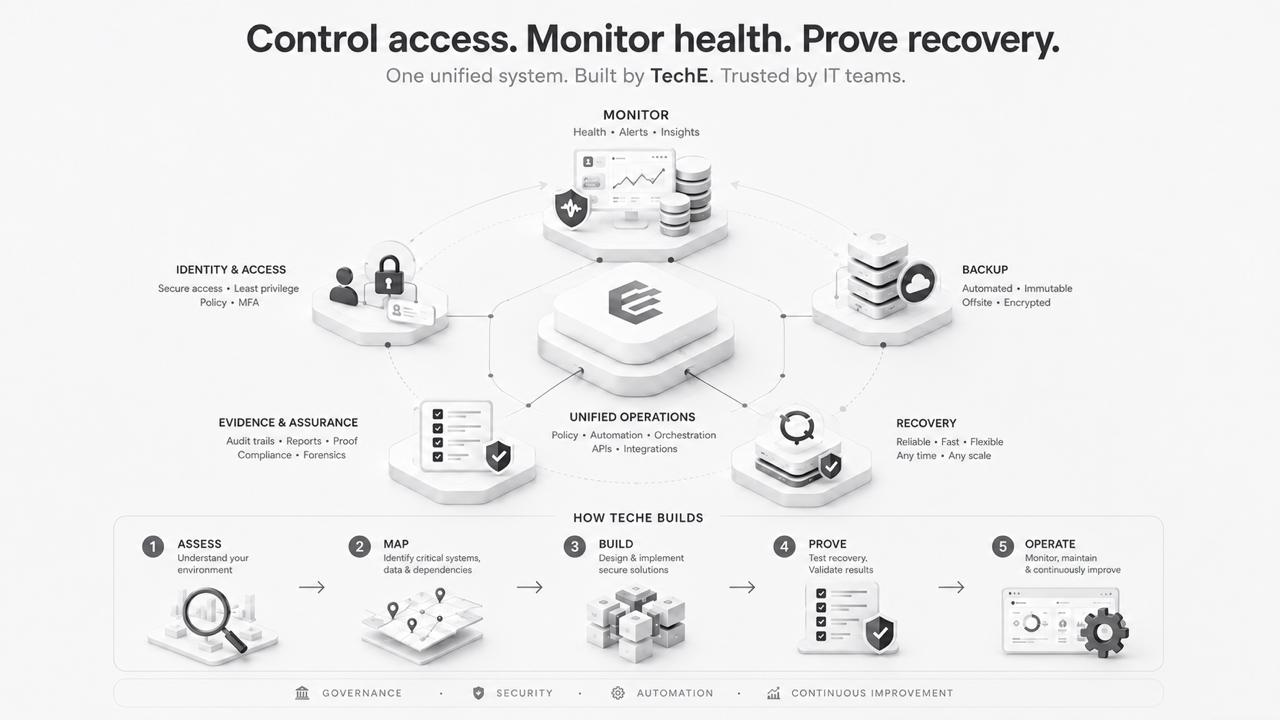
TechE connects business applications, AI, automation, data, recovery and governed infrastructure.
  • WorkApps
  • WorkFlows
  • WorkAI
  • WorkFolios & Spaces
  • WorkSite Management
  • WorkInfra Management
  • WorkServices & Support
  • Work Governance
Local Infrastructure
Cloud and Data
Colocation and Data Center
Backup and Recovery
TechE Operating Core
Governance and Compliance
Business Systems
AI
Automation
Growth and Insights

One TechE Umbrella. One Partner. One Governed Ecosystem.

W — Enterprise-grade Workflow Solutions

100+ AI-powered workflows across business functions.

100+ AI-powered workflow solutions for rapid deployment across business functions—from departmental processes and RAG-enabled knowledge workflows to agentic automation—built on an ecosystem of 200+ business applications.

O — Integrated Business & Technology Operations

18 functions to run, protect, support and improve your systems.

18 operating functions covering deployment, automation, monitoring, security, support, recovery, performance and lifecycle management.

R — Governed Records & Resources

25+ capabilities to organize and govern business information and assets.

25+ management capabilities for files, folders, documents, business records and assets—from capture and collaboration to retention and recovery.

K — Enterprise Knowledge & Intelligence

20+ capabilities to find, share and apply enterprise knowledge.

20+ knowledge capabilities spanning capture, organization, enterprise search, learning, AI-assisted analysis and decision support.

S — Strategic, Implementation & Managed Services

20+ services to plan, deploy, manage and improve your platform.

20+ service offerings spanning assessment, advisory, architecture, integration, migration, deployment, training, support and continuous improvement.

See WORKS in action.

FOR SOLOPRENEURS, SMALL OFFICES & SMALL TEAMS

WorkDesk — your SMB in a box.

A complete business desktop, ready to use.

Give your team one place to manage customers, accounts, everyday work and AI. TechE sets it up, manages it and supports your team.

Choose from an ecosystem of 200+ business applications to suit your business, alongside the commercial tools your team already uses.

40+business applications
and workflows combined
30+ready-made workflows
for everyday team tasks
200+business applications
to choose from

One managed ecosystem for 100+ types of SMBs.ERPNext connects customers, sales, purchasing, stock and accounts. AI helps your team find answers, prepare work and automate routine steps—with email, team chat, office tools and shared files all working together.

WorkDesk deployment choices

Use your current Mac or Windows computer, choose a TechE desktop, or log in to your private work desktop.

YOUR EXISTING COMPUTER

Mac or Windows

Bring your business tools, team workspaces and AI together on the computers your team already uses.

TECHE WORKOS

A TechE computer for work

A private business desktop, set up and looked after by TechE. Powered by TechE WorkOS.

YOUR DESKTOP, AVAILABLE AT LOGIN

Log in to a private desktop

Log in to your private desktop, with your business tools and work ready for you. TechE runs the system behind it (DaaS).

TechE WorkDesk

Private Linux desktop

Private, open-source Linux with a familiar Windows-style experience. No pre-installed ads or bloat. Work locally or access your desktop remotely.

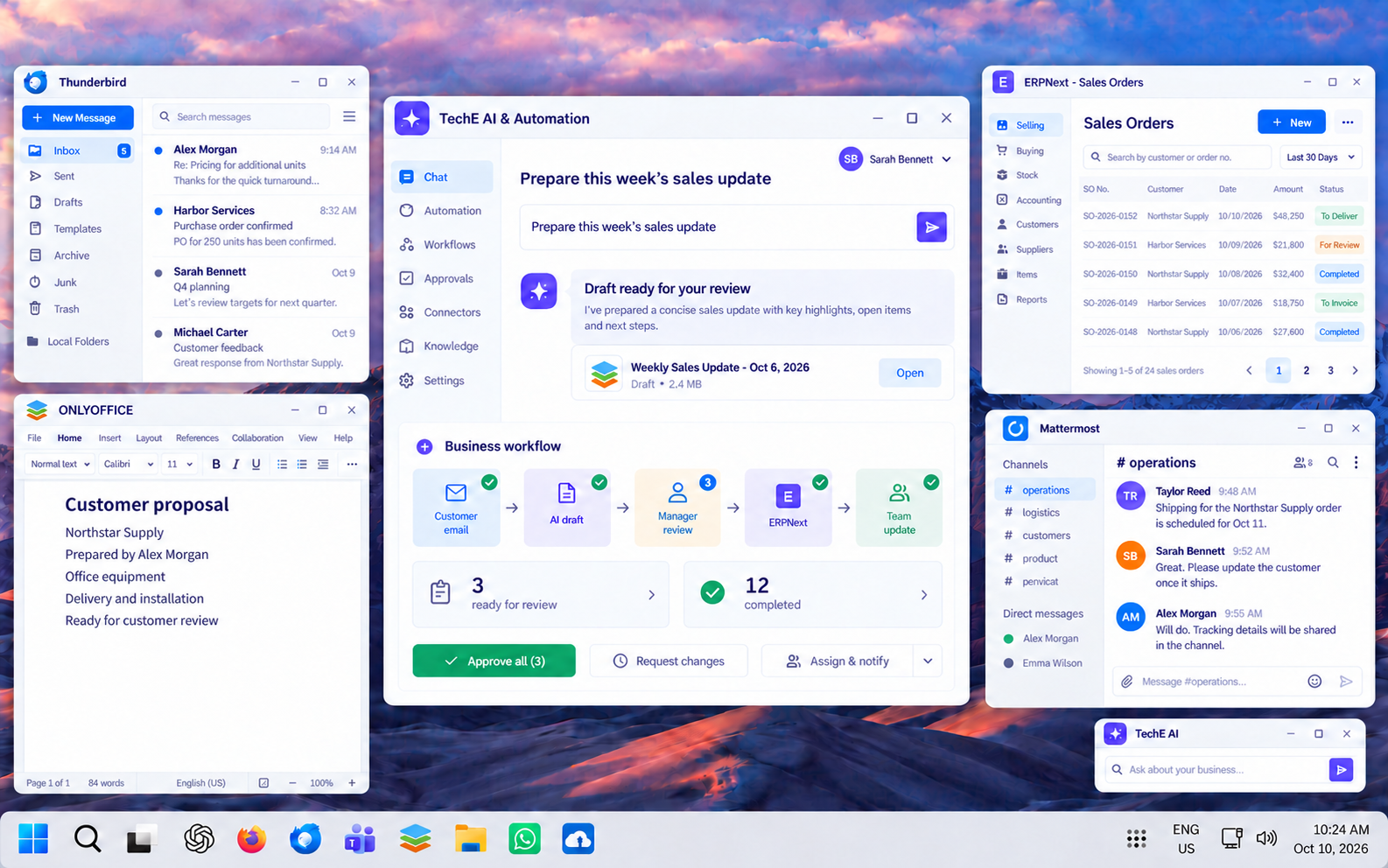
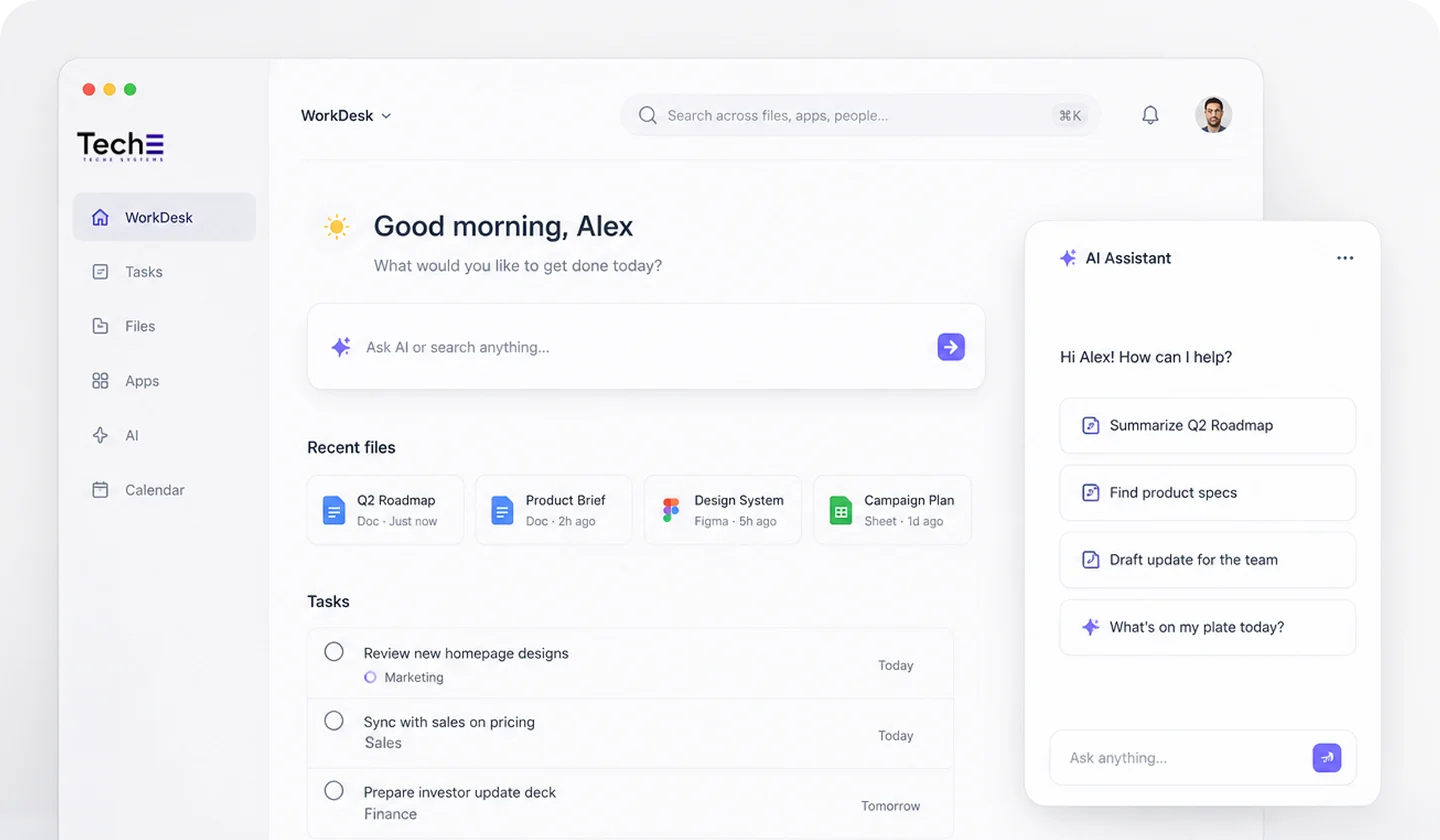
Illustrative TechE desktop with prominent AI and automation, Thunderbird email, ONLYOFFICE, ERPNext and Mattermost
AI-composed preview: Thunderbird email, ONLYOFFICE documents, ERPNext accounts and Mattermost, with TechE AI and automation. Illustrative interfaces and sample data.

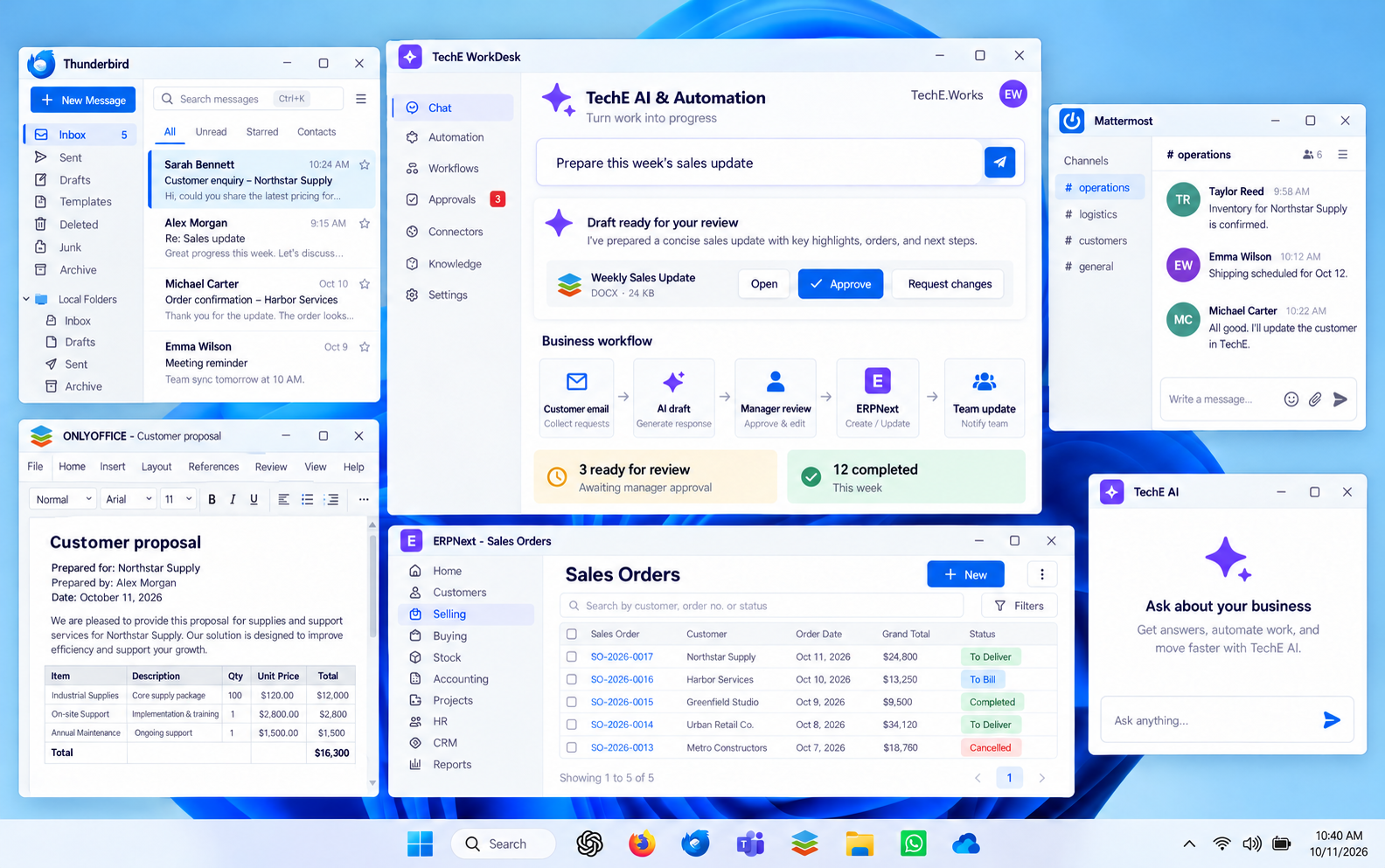
Windows

Windows 11 desktop

Familiar Windows 11. Your business tools, AI and workflows, connected and managed by TechE on your existing computer.

Illustrative TechE desktop with prominent AI and automation, Thunderbird email, ONLYOFFICE, ERPNext and Mattermost
AI-composed preview: Thunderbird email, ONLYOFFICE documents, ERPNext accounts and Mattermost, with TechE AI and automation. Illustrative interfaces and sample data.

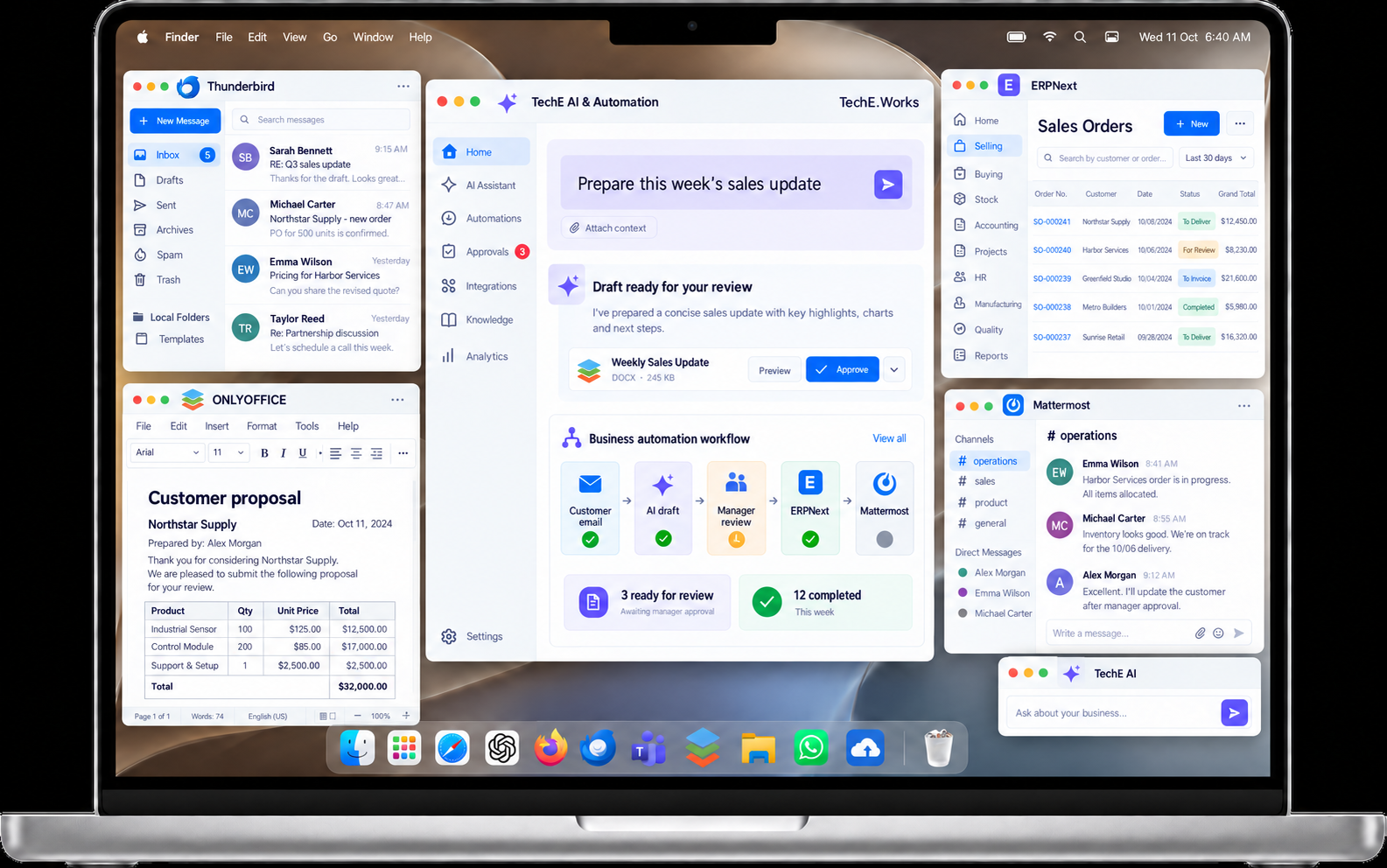
Mac

Apple macOS desktop

Familiar macOS. Your business tools, AI and workflows, connected and managed by TechE on your existing Mac.

Illustrative TechE desktop with prominent AI and automation, Thunderbird email, ONLYOFFICE, ERPNext and Mattermost
AI-composed preview: Thunderbird email, ONLYOFFICE documents, ERPNext accounts and Mattermost, with TechE AI and automation. Illustrative interfaces and sample data.
Learn more about WorkDesk

YOUR BUSINESS TOOLS, WORKING TOGETHER

Inside WorkDesk.

Start ready to work. TechE brings the tools together and sets them up for the way your people do their jobs.

AI, business applications and workflows. Managed together.

01 / WorkApps

Work every day. Run the business.

ERPNext connects the business essentials: customers, sales, purchasing, stock, accounts, projects and everyday operations.

Write documents, work on spreadsheets, talk to your team and run the business. Manage customers, accounts, purchasing and more, with AI tools alongside your everyday work.

Documents & spreadsheetsEmail & team communicationCustomers & salesAccounts, purchasing & ERPProjects & support

What it replacesReplaces disconnected office tools, customer lists and business spreadsheets.

02 / WorkFlows

How work moves.

Sales, HR, accounting, approvals, documents, support and operations become repeatable workflows.

  1. Enquiry
  2. Quotation
  3. Approval
  4. Invoice
  5. Follow-up

Everyone knows what to do next and who is responsible.

What it replacesReplaces email handovers, repeated data entry and chasing approvals.

03 / WorkSpaces

A complete workspace for each team.

WorkSpaces is a feature within WorkDesk. Each team gets its own place for the tools, tasks, files and information it needs. Choose who can see and use each team’s work.

Sales & customer serviceFinance & operationsProjects & leadership
See a team workspace ↓

What it replacesReplaces scattered folders, tabs and separate team workspaces.

04 / WorkAI

AI within the work.

Ask AI to help you find an answer, summarize a document, draft a proposal or plan the next step. It works with the information your team is allowed to use, with people reviewing important decisions.

Summarize a documentPrepare a proposalFind approved knowledgeReview a workflow

What it replacesReplaces isolated AI chats and repeated searches through business information.

30+ READY-MADE WORKFLOWS · INSIDE WORKDESK

Get the everyday work moving.

Follow up a customer. Approve a bill. Welcome a new employee. Start with ready-made steps, then adapt them to your team.

Sales

Assign new enquiries · approve quotations · follow up customers · hand over orders

Finance

Approve bills · repay staff expenses · chase overdue payments · review month-end accounts

HR & people

Welcome new employees · approve leave · check attendance issues · manage leavers

Projects & teams

Assign tasks · review progress · approve timesheets · hand over completed projects

Operations

Approve purchases · reorder stock · add suppliers · request materials

Customer service

Assign requests · schedule service · raise urgent issues · close complaints

Administration

Approve documents · request equipment · give team access · track renewals

Leadership

Review results · clear pending approvals · follow up risks · track decisions

Example workflows for your business. TechE confirms which ones your team needs and how they should work. They are part of the combined WorkDesk offer.

A FEATURE INSIDE WORKDESK · MADE FOR YOUR TEAMS

WorkSpaces. Built into WorkDesk.

Give sales, accounts and other teams their own workspace inside WorkDesk. They keep the tools and information they need together, and share what the business needs to share.

ILLUSTRATIVE TEAM WORKSPACE

From first enquiry to a customer looked after.

A sales team works with customer records, proposals, quotations, follow-ups and service requests in one dedicated workspace.

SalesCustomer serviceTeam lead
BUSINESS TOOLS

Customer management · documents · team communication

WORKFLOWS

Lead → proposal → approval → handover → follow-up

FILES & BUSINESS INFORMATION

Customer history, approved proposals, price lists and service notes

AI HELP & WHO CAN SEE WHAT

Draft a reply, summarize customer history and prepare next steps using permitted information.

See connected operations and leadership examples →

AI · BUSINESS · EVERYDAY WORK

The tools behind your working day.

One connected environment, configured and managed by TechE for your team.

AI for everyday work

Replaces repeated searching, copy-and-paste prompts and disconnected AI conversations.

AI help with questions, analysis and drafts
Open WebUI
Answers from your business documents
AnythingLLM
Find knowledge across connected sources
Onyx
Meeting notes and summaries
Meetily
Run selected AI models privately
Ollama

Business, accounts & people

Replaces separate customer lists, stock sheets and disconnected sales, purchasing and accounting records.

Customers, sales, purchases, stock and accounts
ERPNext
People, leave, attendance and payroll
Frappe HR
Team tasks and follow-ups
Vikunja
Shared business lists and records
Baserow
Reports and business dashboards
Metabase

Email, conversations & meetings

Replaces scattered email threads, personal messages and back-and-forth meeting arrangements.

Email, calendars and contacts
Thunderbird
Managed business email service
Mailcow
Team channels and messaging
Mattermost
Video meetings
Jitsi Meet
Appointments and booking
Cal.com

AI actions & connected workflows

Replaces repetitive data entry, manual handovers and chasing routine updates.

Connect routine steps across business tools
n8n
Build AI-assisted business processes
Dify
Connect AI tools and information
Flowise
Assist with permitted tasks and actions
OpenClaw
Prepare documents for AI and workflows
Docling

Office, files & documents

Replaces scattered attachments, duplicate documents and disconnected file and signing tools.

Documents, spreadsheets and presentations
ONLYOFFICE
Shared files, folders and team collaboration
Nextcloud
Find and organize scanned records
Paperless-ngx
Merge, split and work with PDFs
Stirling PDF
Prepare and sign documents
DocuSeal

Knowledge, notes & planning

Replaces knowledge scattered across notebooks, chat history and disconnected planning files.

Team guides and business knowledge
BookStack
Notes and reference material
Joplin
Write and edit notes together
HedgeDoc
Sketch ideas and plans
Excalidraw
Map processes and business flows
diagrams.net
Founder / Owner-Led

Founders · SOHO · Owner-Led SMBs

Starting scope

WorkDesk: start with the daily operating surface

Apps, files, records, workflows, approved AI, support, monitoring, and recovery posture in one governed work surface.

Start with WorkDesk

WorkDesk scope

A complete business desktop, ready to use.

Give your team one place to manage customers, accounts, everyday work and AI. Use your current Mac or Windows computer, choose a TechE desktop, or log in to your private work desktop. TechE sets it up, manages it and supports your team.

Illustrative TechE WorkDesk with AI, automation, email, documents, ERP and team communication

40+ business applications and workflows combined, including 30+ ready-made team workflows.

USD 500 / month / user. Setup, management and support included.

Inside WorkDesk · Services and inclusions · Start with WorkDesk

READY TO START. MANAGED AS A SYSTEM.

The work environment. The services around it.

For small offices, entrepreneurs and growing teams who want to get going quickly—with someone to look after the whole setup.

01

Get started

TechE sets up your tools and workspaces, brings your team in and helps them get started.

02

Keep working

TechE looks after the systems, updates and day-to-day support, so your team can focus on work.

03

Keep your work protected

Private workspaces, permission settings, backups and help restoring work. Privacy and compliance requirements are agreed for your business.

BUILT FOR THE BUSINESS

Business-wide transformation.

Start with the work that needs help. Bring your people, information and business tools together as the business grows.

THE SMB PATCHWORK, CONNECTED

You should not have to spend your day making disconnected tools work together.

SCATTERED WORK

Too many logins and suppliers. Files in different places. Work passed around by email. Nobody responsible for the whole setup.

ONE GOVERNED PATH

Tools that work together. A workspace for each team. Shared business information. One partner to look after the setup.

The owner should not become the integration layer.
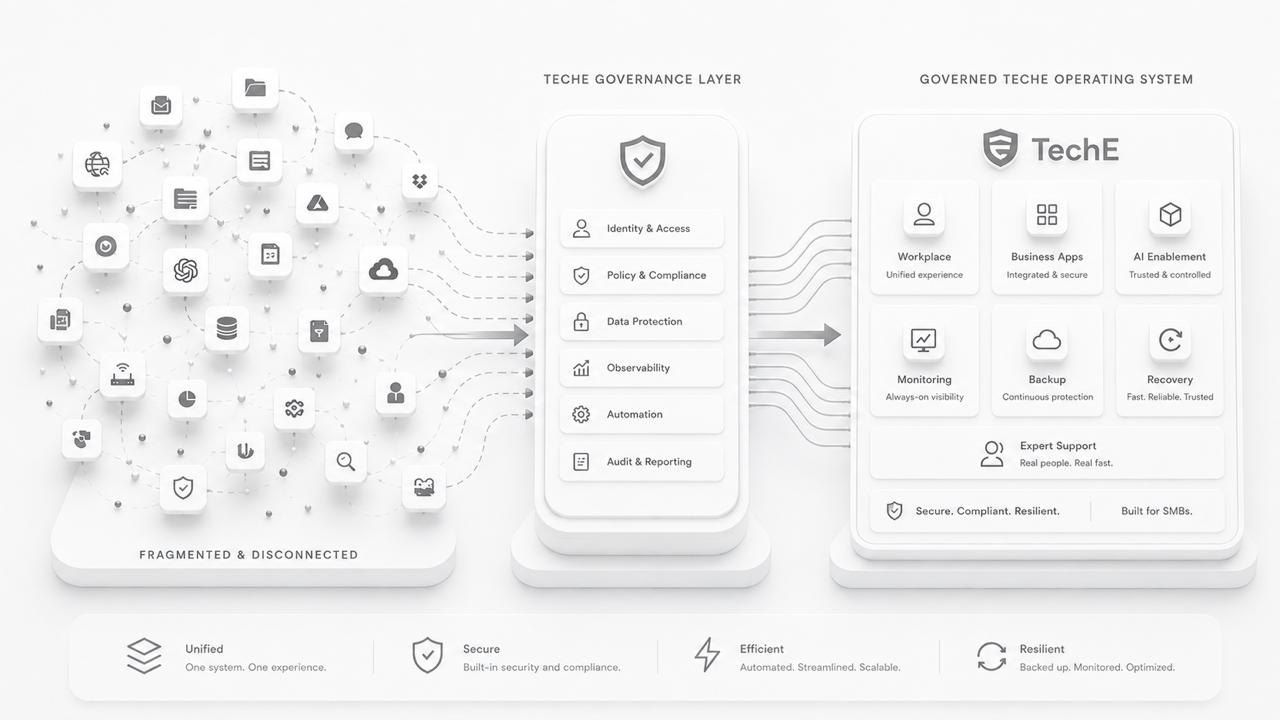
TechE turns assembled patchwork into one governed business system.

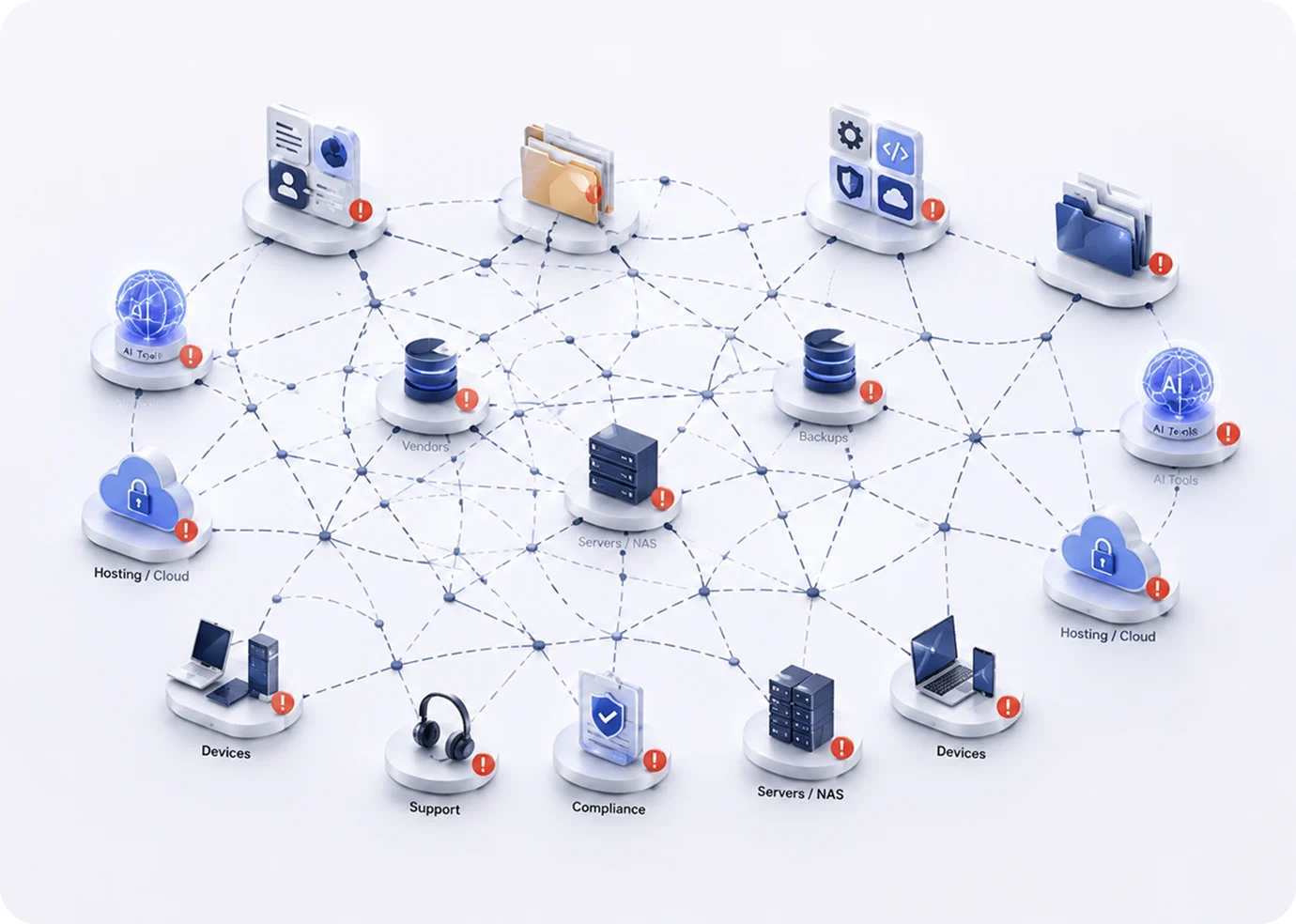
Original TechE illustration of disconnected business tools, files, suppliers and systems
Explore connected teams, departments and locations

Connect the work across teams, departments and locations. WorkSpaces is also a feature inside WorkDesk; the examples below show how shared work grows across a business.

ILLUSTRATIVE TEAM WORKSPACE

Keep the everyday business moving.

Operations and finance work together on purchasing, suppliers, invoices, inventory and approvals, with a clear owner for the next step.

OperationsFinanceApprover
BUSINESS TOOLS

Business ERP · spreadsheets · documents · team communication

WORKFLOWS

Purchase request → approval → order → receipt → invoice review

FILES & BUSINESS INFORMATION

Supplier records, purchase orders, invoices and operating procedures

AI HELP & WHO CAN SEE WHAT

Extract document details, surface exceptions and prepare a draft summary for the responsible person.

ILLUSTRATIVE TEAM WORKSPACE

Keep priorities and delivery connected.

Project teams and leaders share plans, decisions, responsibilities and progress without assembling updates from disconnected tools.

Project teamManagerLeadership
BUSINESS TOOLS

Projects · tasks · business reporting · team communication

WORKFLOWS

Plan → assign → deliver → review → follow through

FILES & BUSINESS INFORMATION

Project briefs, decisions, milestones and approved business reports

AI HELP & WHO CAN SEE WHAT

Summarize project updates, find previous decisions and prepare a review using the team’s authorized information.

01
Daily work & collaboration

One place for the team’s daily work.

02
Files, records & knowledge

Find the right information and share it with the right people.

04
Workflows & approvals

Clear next steps, clear responsibilities and fewer missed tasks.

Founders & small officesProfessional offices & consultantsClinics & privacy-sensitive teamsRetail, warehouse & fieldBranches & franchisesGrowing & established businesses

Built For. Business-Wide Transformation.

Built For

Professional & Knowledge

Professional Offices · Agencies · Consulting · AI

Operational & Site-Based

Retail · Warehouse · Factory · Field

Multi-Site & Franchise

Franchise · Multi-Site · Distributed Teams

Established MSME

Growing SMB · Established MSME · Global

Business-Wide Transformation

01
Daily Work & Collaboration
AfterOne governed daily workspace
Before & delivery path
BeforeScattered apps · email · tasks · passwords
PathWorkDesk · Biz Basics
02
Files, Records & Business Knowledge
AfterFindable · reusable · permissioned knowledge
Before & delivery path
BeforeScattered files · records · SOPs · memory
PathWorkDesk · Governed Files · Knowledge
04
Workflows, Forms & Approvals
AfterVisible steps · surfaced exceptions · accountability
Before & delivery path
BeforeEmail · sheets · handoffs · manual follow-up
PathBiz Flows · Forms · Approvals

Business situations and delivery paths

Where the patchwork shows up

The SMB problem

SMB Tech Patchwork

Connected SMB technology components under one TechE operating model

SaaS Overrun

subscriptions logins disconnected data

File Chaos

contracts records forms approvals

DIY Assembly

prompts files outputs decisions

Hidden Staffing Load

admin vendor chasing manual support

From patchwork to one governed path

From patchwork to one governed path

Recognize what changes before choosing the deeper path.

Today
Scattered files and records
Governed files, records, roles and workflows
Today
More SaaS, more logins, more renewals
Curated business systems and workflows
Today
Public AI used ad hoc
Approved AI and private AI / RAG paths where needed
Today
Random cloud, VPS, NAS and backup boxes
Managed package infrastructure with a governed scale-up path
Today
Vendor and MSP ping-pong
One operating path with clear ownership
Today
The owner becomes the integration layer
A mapped, scoped and governed business system

Why operating pressure is rising

Why the operating pressure is rising

Tool Sprawl

Disconnected work

AI acceleration

More unmanaged paths

Hybrid work

More access points

Security pressure

More exposure

Growth complexity

More coordination

Warehouse & production

Connect scanners, stock movement, equipment information and maintenance tasks.

Clinics & professional teams

Bring records, documents, scheduling and devices into controlled staff workflows.

Branches & field teams

Repeat a working setup across locations, with local support and continuity.

This is you if

Technology has become a setof disconnected islands

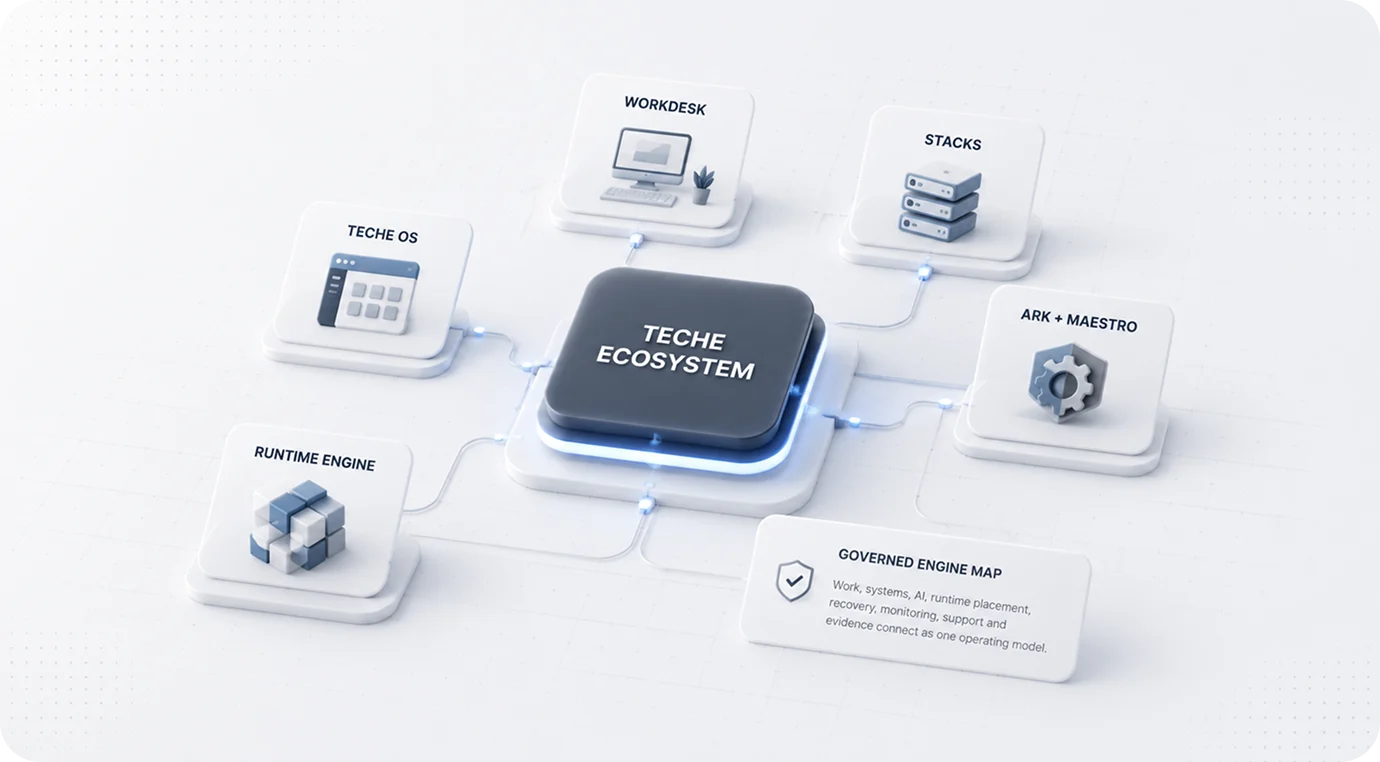
TechE is built around one operating idea: SMB technology should operate as one governed business engine.

TechE governance layer connecting fragmented technology into a governed operating system

Complete starting-path matrix

Start with the pain that matters most

The entry point changes. The governed operating model stays intact.

If the pain is Start with Go deeper with
Daily work is fragmented WorkDesk Stacks, workflows and approved AI
Processes are inconsistent Stacks and governed workflows Automation and scoped agents
AI use is uncontrolled Approved AI / private RAG AI capacity and placement review
Recovery is unclear ARK recovery review Restore evidence and continuity scope
Monitoring is missing Maestro Operating signals, escalation and lifecycle
Infrastructure placement is unclear Sovereign Infra review Host Units, site, colo or hybrid path
Local/site systems are needed Hardware path review Edge Engine, WorkDesk 2.0, Converged Hub or UNO
Cost is leaking Patchwork Cost Worksheet Tech Estate Assessment
The estate is not understood Digital Twin assessment Controlled change and optimization
The complete model is needed Ecosystem White Paper Business or Technical Blueprint

Scope clarity

Configurable system. Consistent operating discipline.

01

Start proportionately

TechE can start hosted, hybrid, on-premise or site-based. Not every client needs every layer on day one.

02

Add only when justified

Hardware follows placement, recovery, AI, storage, site and lifecycle needs. AI follows workload, data, context, concurrency and capacity.

03

Qualify every claim

Compliance readiness depends on industry, region, data, policy, practice and approved deployment scope.

What each path solves

Start where the business pain is real.

WorkDesk
Daily work stops being scattered.

Apps, files, records, workflows, approved AI, support and recovery posture come into one governed work surface.

Advanced Tech
AI and automation become governed deployments.

Private AI, RAG, document intelligence, dashboards, IoT and process systems are assessed against real business requirements.

Sovereign Infra
Infrastructure becomes measured capacity.

Add private, local, regional, on-premise, colocation or higher-capacity systems only when workload and control justify it.

Managed Estate
The whole technology estate gets an owner.

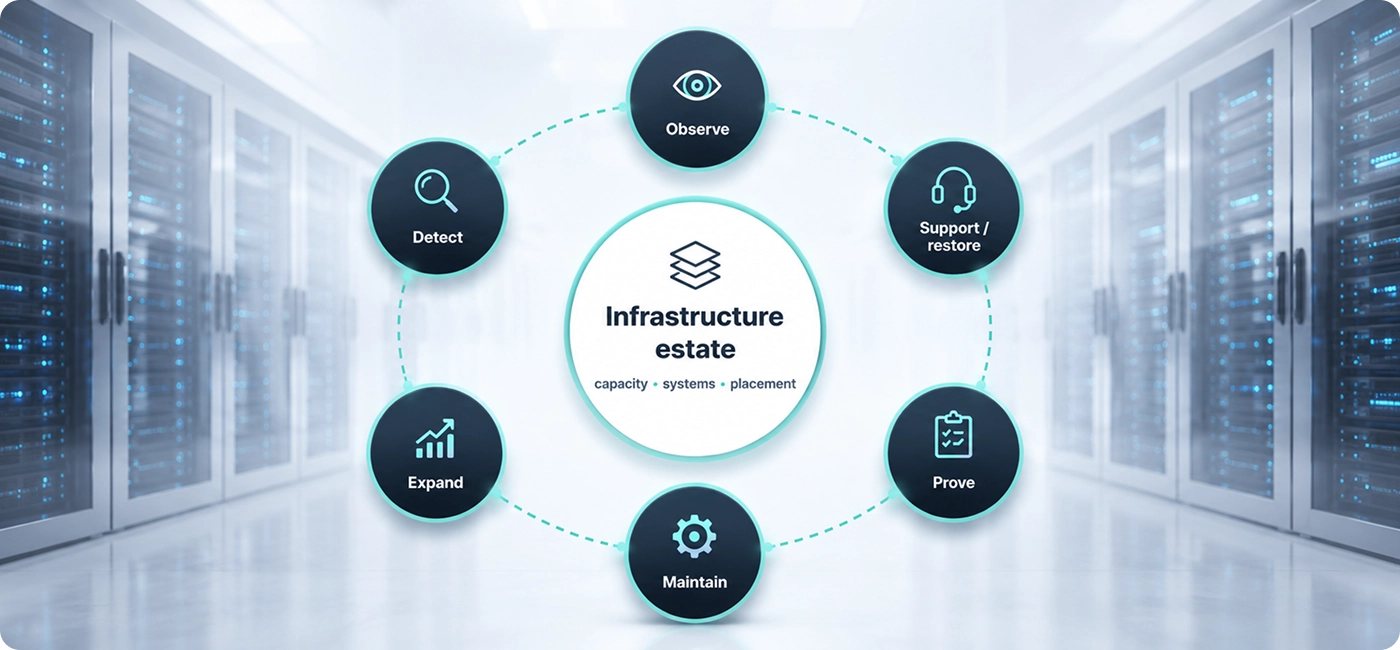
Map users, sites, systems, vendors, access, monitoring, recovery and lifecycle into one managed operating model.

Real SMB Situations

For SMBs where data, workflows, privacy, recovery and operating discipline matter.

Use the situation that looks most like your business. TechE starts with the real operating problem and chooses the smallest governed path that solves it.

Built for real operating situations

Start with the situation that looks like your business.

Founder / Small teamWorkDesk
Growing SMBWorkDesk + Systems
Privacy / AdvancedAdvanced Tech
Multi-site / ComplexTech Estate
Before → path → outcome

Six common SMB transformation patterns.

Before

Solo founder

Tools, files and AI are scattered.

TechE path

Hosted WorkDesk with starter systems.

Outcome

One governed surface before adding complexity.

Before

2–20 user office

Everyone works differently and onboarding is messy.

TechE path

WorkDesk, roles, apps, files, records and starter workflows.

Outcome

Repeatable daily operation.

Before

Privacy-focused firm

Sensitive files and AI need control.

TechE path

Private AI/RAG, controlled storage, evidence paths and placement.

Outcome

Governed data and AI use.

Before

Clinic / professional office

Records, staff access, forms, billing and privacy are fragmented.

TechE path

WorkDesk first; private/local systems when justified.

Outcome

Controlled daily operation and clearer recovery.

Before

Warehouse / factory / site

Devices, workflows, site users and dashboards are disconnected.

TechE path

WorkDesk + Advanced Tech + local/site infrastructure where needed.

Outcome

Governed real-time/site operation.

Before

Established MSME / multi-site

Offices, vendors, servers, cloud accounts and support paths are fragmented.

TechE path

Managed TechE Estate.

Outcome

Users, sites, systems, AI, support and lifecycle under one model.

This is business transformation, built as an operating system.

Start with the path that matches the problem now. Scale only when the business case justifies it.

Multi-Site / Global Path

Repeatable operating model across teams, branches, sites, regions, and distributed operations.

BUILD ON THE WORK YOUR TEAM ALREADY DOES

AI & Advanced Tech Deployments

When you’re ready to build an AI-native business, bring AI into how you serve customers, deliver work and make decisions.

Move business AI into approved paths, private knowledge, automation, analytics, and governed workflows.

Approved AI first. Private AI where justified.

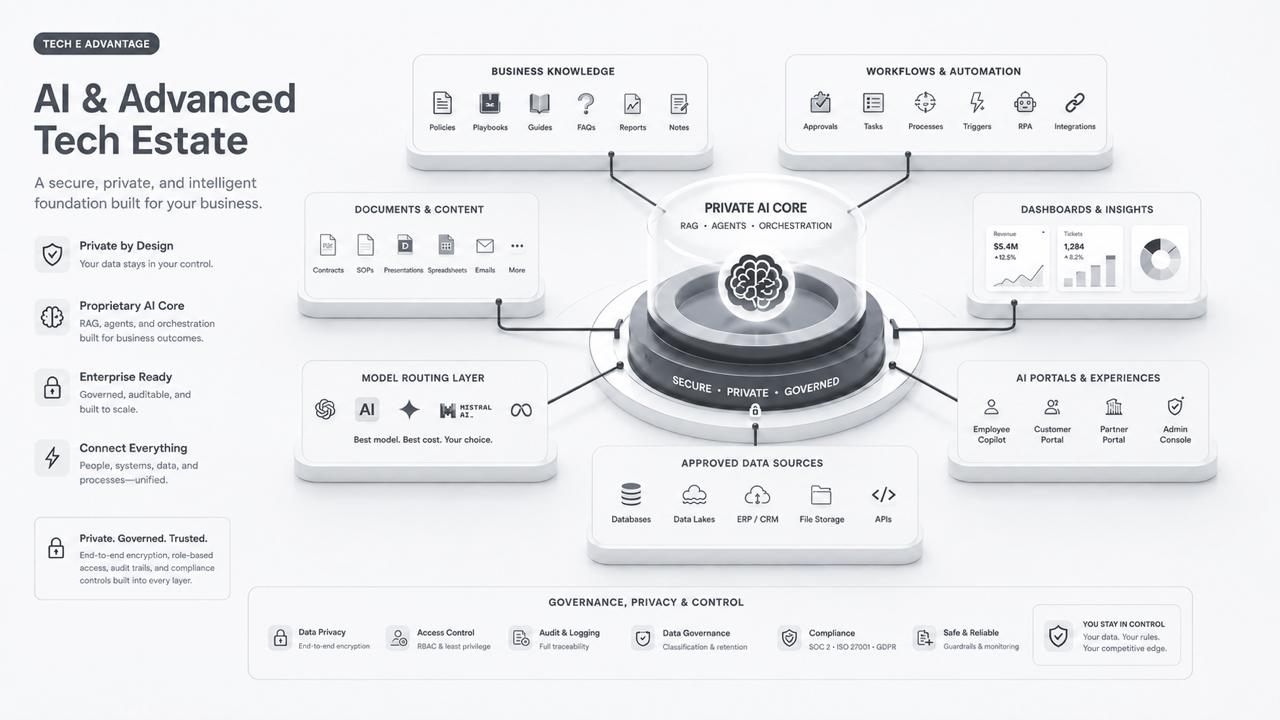
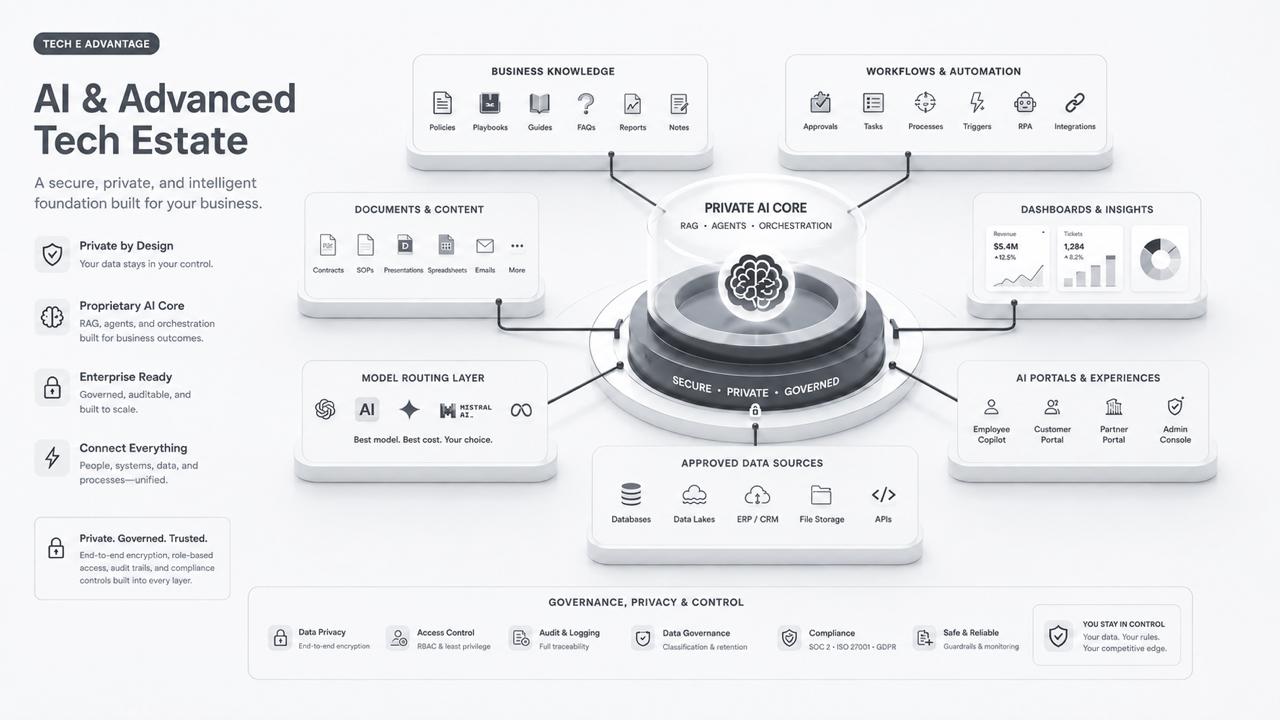
Original TechE AI estate diagram connecting company knowledge, documents, workflows, dashboards, model choices and business systems
The original TechE AI estate: a wider business system, from company information to AI-assisted work. Controls and deployment requirements are agreed for each business.
01 / GET ORGANIZED

Your people, applications and information in WorkDesk.

02 / CONNECT AI TO THE WORK

Choose a useful job and the information it needs.

03 / EXPAND WHAT WORKS

Add assistants, automation and visibility as needed.

WHAT CHANGES WHEN YOUR BUSINESS BECOMES AI-NATIVE

Redefine the work. The team. The skills you need.

Build AI into how the business gets work done—from the first request to the finished result. Rework routines, responsibilities and capacity around what people and AI can do together.

AI SPECIALIST SUPPORT, AT YOUR DISPOSAL

Like having a team of PhDs, MBAs, accountants and legal experts at your disposal.

Research, analyse, draft and plan across the business. AI prepares the work; your people bring context, judgement and approval.

Choose the depth your work needs: complex operations, specialist AI, or demanding infrastructure. Business size alone does not determine the path.

Explore complex business operations
Clinic & Privacy-Sensitive

Clinics · Regulated · Privacy-Sensitive

BEYOND DESK WORK

Devices, sites and live business operations.

The wider TechE offering also connects scanners, sensors, cameras, local systems and operational information where the business needs them.

Live dashboards & process alerts

See changing conditions and send the right person an alert or task.

ClinicsFinance & advisoryLegal & professionalEducation & trainingManufacturing & warehouseDevices & sensorsIndustrial processesBranches & field teams
AI & Advanced Tech

Advanced tech belongs inside the governed business system.

TechE assesses private AI, RAG, automation, IoT/device workflows, real-time dashboards, process intelligence and private/local systems against the actual business requirement.

One governed advanced-tech path

Private AI, RAG, automation, IoT and real-time systems — assessed as business systems.

Advanced technology belongs inside the governed business system. TechE starts with the requirement, data, users, process, locality and recovery needs before choosing the architecture.

Private AI & RAG

Approved company knowledge, source-backed search and answers, private/local paths where justified.

Automation

Documents, approvals, workflows and business processes that need controlled automation.

IoT / Edge

Sensors, scanners, cameras, gateways and local AI with monitoring and lifecycle discipline.

Real-time / Process

Dashboards, operational data, device workflows and site/process systems.

Where it applies

Eight common deployment contexts.

Healthcare / Clinics

Records, scans, devices, scheduling, billing, AI and recovery need controlled access and evidence-ready workflows.

Finance / Advisory

Client data, approvals, AI use and vendor/workflow changes need governance and monitoring.

Legal / Professional

Confidential files, matters, contracts, discovery and AI-assisted work need approved-data paths.

Education / Training

Student records, learning systems, devices, payments and communications need privacy-aware access and recovery.

Manufacturing / Warehouse

Production, inventory, scanners, maintenance and site workflows need reliable local or hybrid systems.

IoT / Sensor / Edge

Edge devices need placement, latency control, monitoring, privacy and lifecycle ownership.

Industrial / Process

Machines, controllers, operational data and process systems need secure integration and controlled change.

Multi-site / Field / Franchise

Branches and mobile teams need repeatable systems, site readiness, support and local continuity.

Explore AI examples, capabilities and assessment
01 / AI CHAT
Help with a question.

Ask for an answer, a draft or an idea. Someone takes the result into the next step.

02 / AI WITHIN AN APP
Help with a task.

Use AI inside email, documents, sales or another application to assist with that part of the work.

03 / AN AI-NATIVE BUSINESS
Redesign the whole workflow.

Connect business information, applications, people and AI around a result—with ownership, approvals and follow-through.

WORKFLOWS
Remove repeat handling.

Automate agreed routine steps. Route unusual cases and important decisions to the right person.

STAFFING & CAPACITY
Plan around the work.

See what can be automated, AI-assisted or kept with people before changing roles or adding capacity.

SKILLS & EXPERTISE
Build the right skills pool.

Combine team knowledge, AI specialist support, training and outside expertise where it is needed.

Real work. Recognisable results.

Examples of workflows we can scope around your business information, tools and review process.

01 / WEBSITE & MARKETING
Turn a new service into a website draft.

Start with your service brief, approved claims, pricing and brand material.

AI PREPARESPage structure. Website copy.
A working page draft.

Your team reviews the offer, checks the details and approves publishing.

THE CHANGEMove from a blank page to something the business can review.
02 / PRESENTATIONS & PROPOSALS
Walk into the meeting with a prepared presentation.

Bring your meeting notes, proposal brief and checked business figures.

AI PREPARESAn editable PowerPoint draft.
Charts. A story. Speaker notes.

The presenter checks the numbers, refines the message and makes it their own.

THE CHANGESpend preparation time on the decision and the audience.
03 / MARKET RESEARCH
Understand the market before you commit.

Choose the market, competitors and questions you need answered.

AI PREPARESA sourced market brief.
Competitor comparisons. Open questions.

Scan selected reports and public sources. Keep dates and references so the team can check the findings.

THE CHANGEBring the evidence together before choosing your next move.
04 / AGREEMENTS & COMMERCIAL DOCUMENTS
Start an agreement with a structured draft.

Use approved templates, agreed commercial terms and the parties’ details.

AI PREPARESA draft agreement.
Missing details. Points for review.

Your legal adviser reviews the terms and suitability before anyone relies on or signs the agreement.

THE CHANGEGive the reviewer an organised starting point and clear questions.
05 / ROUTINE OPERATIONS
Let routine admin move itself forward.

A supplier invoice arrives. The business already has its purchase and delivery records.

THE WORKFLOWRead. Match. Route for approval.
Update the record. Notify the team.

Automate agreed steps; flag mismatches for a person. Payment stays within the business’s approval rules.

THE CHANGEHandle exceptions instead of repeatedly copying the same information.
06 / PEOPLE, SKILLS & PLANNING
Plan next month’s work before adding headcount.

Bring expected demand, current workloads, roles and the team’s skills.

AI HELPS PREPARECapacity scenarios. A skills map.
Automation and training options.

Managers decide how to assign work, develop staff and bring in specialist help.

THE CHANGEPlan the mix of people, skills and automation around real demand.

Start with one real workflow. Measure turnaround, quality, rework and time spent before deciding what to expand.

See what the assessment delivers

The capabilities behind the work.

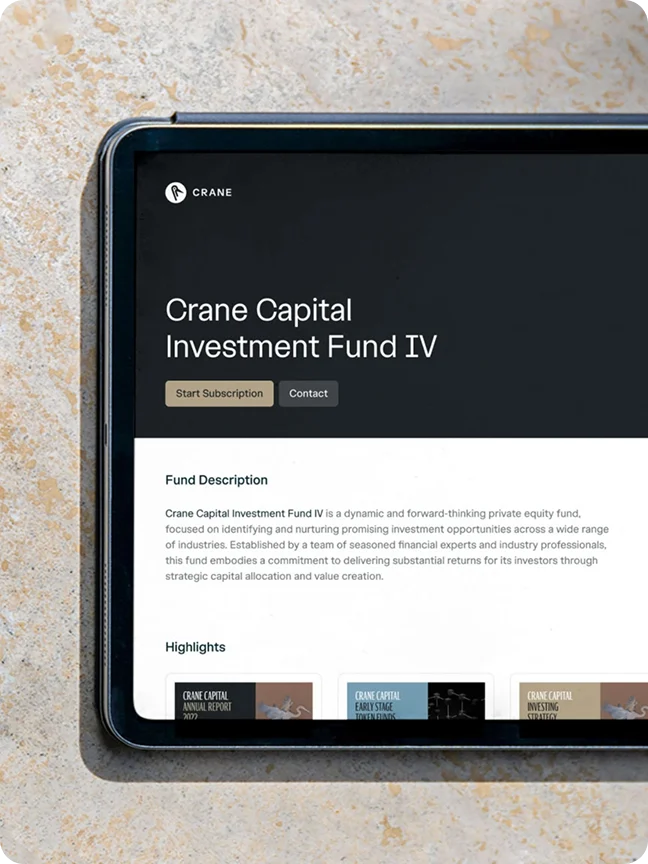
Retained original tablet reference photograph
01 / APPROVED AI
Useful AI for everyday work.

Give staff an agreed way to work with AI across their questions, files, drafts and daily tasks.

FOR YOUR BUSINESS

Draft a customer reply using approved product information, then let the team review it before sending.

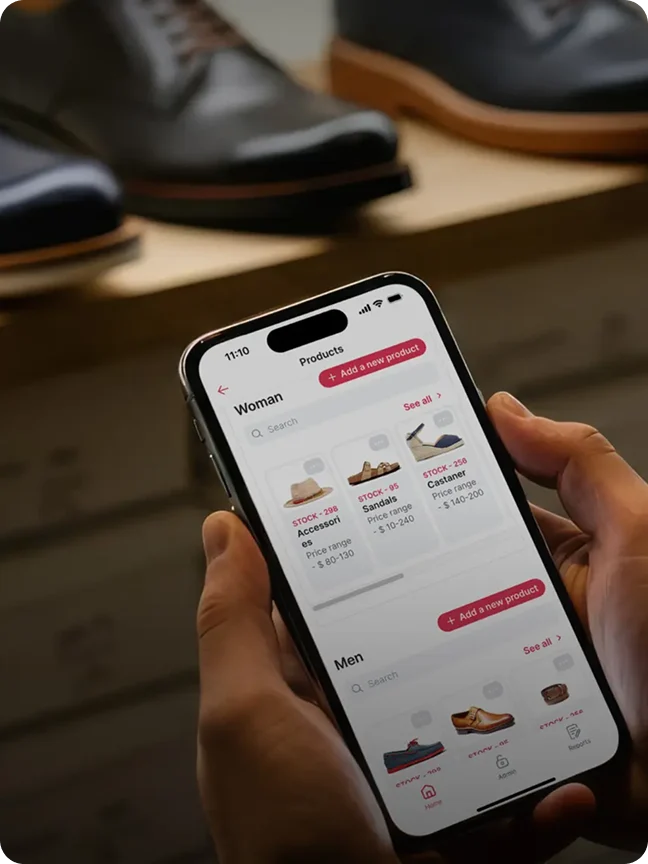
Retained original handheld-device reference photograph
02 / PRIVATE AI & COMPANY KNOWLEDGE
Ask your business information.

Search and ask questions across company documents and knowledge, with access limited to the information each person may use.

FOR YOUR BUSINESS

Find the answer in a policy, contract or manual, with the source alongside it. Private document search and RAG sit behind the experience.

Retained original business-workflow reference photograph
03 / AI-ENABLED WORKFLOWS & ASSISTANTS
Move the work forward.

Connect repeated work, approvals, reports and handovers. Add AI assistants and actions where the process is clear.

FOR YOUR BUSINESS

Read an enquiry, prepare a draft quotation, ask for approval, update the customer record and notify the team.

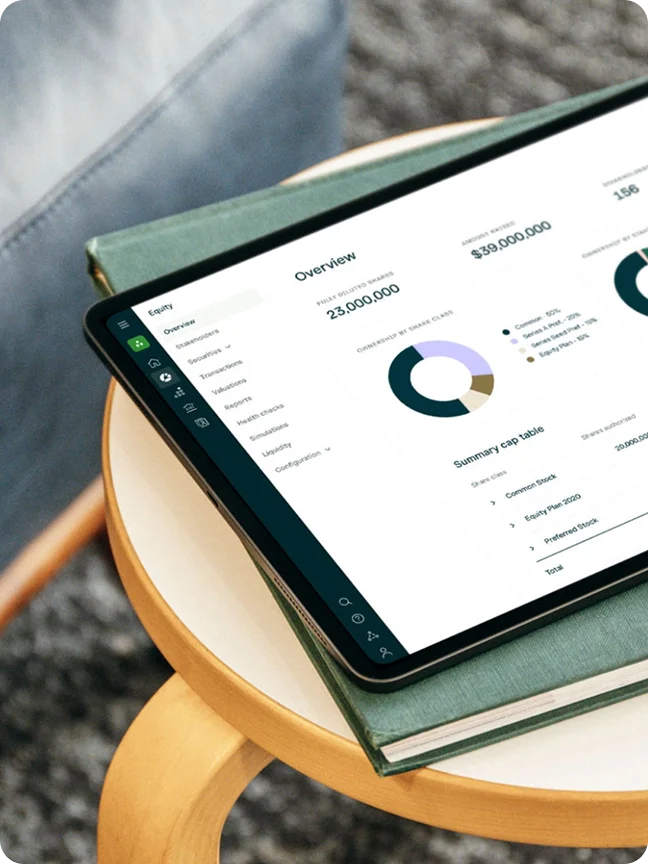
Retained original business-reporting reference photograph
04 / DASHBOARDS & ANALYTICS
See what needs attention.

Bring sales, finance, support and operations into a clearer view, with the business records behind the numbers.

FOR YOUR BUSINESS

Review overdue invoices, pending orders, open customer requests and progress across branches in one place.

Retained original document-work reference photograph
05 / DOCUMENT INTELLIGENCE
Make paperwork useful.

Read, sort and find information in business documents, then pass it into the right workflow.

FOR YOUR BUSINESS

Read a supplier invoice, match it to a purchase order and send anything unusual to a person for review.

Retained original business-portal reference photograph
06 / PORTALS & BUSINESS SYSTEMS
Connect the people around you.

Build useful places for customers, staff and suppliers to submit work, share information and follow progress.

FOR YOUR BUSINESS

A customer submits a service request and its documents. The right team receives it and tracks it through to completion.

Original device photographs retained consistently as reference visuals; they are not screenshots of the AI products described.

MORE THAN ONE AI CHAT WINDOW

The right AI tools. Connected to your business.

Company knowledge, private models, desktop helpers, team assistants and connected workflows can work together. TechE selects and configures the tools around the job.

Company knowledge & documents

Help people find answers in the information the business already owns.

AnythingLLM
AI on your desktop & for your team

Choose the chat experience and local or hosted models that fit your work.

Open WebUIOllama
Assistants that help with tasks

Connect AI to permitted tools and channels, with agreed limits on what it can do.

OpenClawDesktop AI assistance
AI-enabled business workflows

Connect email, business applications and team updates, with approval where needed.

n8n

Examples of tools for a scoped deployment, not a promise that every tool or advanced integration is included in every WorkDesk package.

Match the tools and cost to the job.

Use the right model, the right company information and the right place to run it. Reuse work where possible and avoid paying for more capacity than the task needs.

How TechE manages AI cost

AI cost discipline improves when prompts, RAG, routing, caching, model selection, and workload placement are designed together.

AI & ADVANCED TECH ASSESSMENT

Know what to change. What to keep. Where to start.

We examine how your business works today, identify useful changes and define a first deployment you can evaluate.

What we do with you

  1. 01
    Understand the business

    Agree the outcome, users and bottlenecks. Walk through a real job with the people who do it.

  2. 02
    Map the information and systems

    Review documents, business applications, access, privacy and any devices or locations involved.

  3. 03
    Redesign the work and responsibilities

    Identify routine steps, AI-assisted tasks, human decisions, skill gaps and training needs.

  4. 04
    Choose a practical first deployment

    Consider tools, integrations, running costs, support and recovery. Define what a pilot must prove.

WHAT YOU TAKE AWAY

A decision pack for your next move.

  • Prioritised opportunitiesWhat to start, defer or leave alone—and why.
  • A proposed workflowSteps, information, system connections, owners and approvals.
  • A people-and-skills planRoles, capacity assumptions, training and specialist support needs.
  • A deployment outlineRecommended approach, dependencies, risks and estimated setup and running costs.
  • A measurable pilot briefScope, responsibilities, success measures and a go/no-go checkpoint.
MEASURE THE CHANGE
Turnaround time

How long does the work take?

Quality & rework

How often does it need correcting?

Team capacity

Where is people’s time actually saved?

Bring one process you want to improve.

A brief description, the people involved and a few representative examples are enough to start the conversation. We agree assessment scope, fees and deliverables before work begins; implementation follows a separately agreed plan.

Book AI & Advanced Tech Assessment

Request a discussion to agree the assessment.

Deployment scope and supporting capabilities

Advanced capability and infrastructure

Deployment scope and supporting capabilities

Approved AI first. Private AI where justified.

Move business AI into approved paths, private knowledge, automation, analytics, and governed workflows.

AI and Advanced Tech Estate showing private AI core, business knowledge, workflows, documents, dashboards, model routing, portals and approved data sources

Approved AI

Approved AI business workspace

Controlled Staff AI Paths

Prompts, files, workflows, outputs and business use cases move through approved paths.

Private AI / RAG

Private AI and RAG workspace

Private Knowledge Paths

Document intelligence, embeddings, retrieval, model routing and approved data boundaries where scoped.

Automation / Agents

Business automation workflow in use

Governed Automation After Process

Repeated work, approvals, reports and handoffs become controlled automation—not uncontrolled experiments.

Dashboards / Analytics

Business analytics dashboard

Operating Visibility

Business activity, workflows, tickets, sales, finance and operations become more visible.

Document Intelligence

Document intelligence workflow on a mobile device

Business documents become usable intelligence

Extract, classify, search, and govern documents.

Portals / Systems path

Purpose-built business portal workflow

Purpose-built business surfaces

Portals and workflows for customers, staff, vendors, devices and operations.

How TechE handles this

How TechE manages AI cost

AI cost discipline improves when prompts, RAG, routing, caching, model selection, and workload placement are designed together.

03
AI & knowledge work

Useful AI help, using company information with people in control.

03
AI & Knowledge Work
AfterApproved paths · reusable knowledge · human control
Before & delivery path
BeforeUncontrolled AI · prompts · files · duplicate work
PathApproved AI · Private AI/RAG

AI Needs Approved Paths

prompts files outputs decisions

Starting scope

AI & Advanced Tech: assess heavier requirements first

Private AI, RAG, automation, IoT, real-time, process, site, and controlled deployment needs enter one assessment path.

Book AI & Advanced Tech Assessment
Assessment

Turn the business need into a governed deployment.

Map the data, workflow, privacy, device and infrastructure requirements before choosing the technology.

Applications first · placement second

AI becomes useful when it enters a governed business path

Start with the work the business needs to improve. Then decide data boundaries, retrieval, workflow, model class, capacity and placement.

Business Q&A · SOP search and policy answers

Document intelligence · extraction, classification, search and routing

Support and operations · helpdesk, tickets and operating context

Advanced local AI · private capacity where the workload justifies it

Communication preparation · email, proposals and meetings

Professional knowledge work · source-backed analysis and drafting

Workflow copilots · governed assistance inside repeatable processes

business applications BUSINESS APPS HUMAN WORKFLOWS GOVERNED RECORDS AI-READY WORKDESK PRIVATE RAG AUTOMATION SCOPED AGENTS DEDICATED AI / HOST PATH
Business application workflow on mobile

Technical publication gate: model-family examples, throughput, concurrency and performance claims remain candidate guidance until validated against the approved runtime and deployment.

Advanced Tech Deployments

Custom AI, automation, dashboards, portals, data workflows, and document intelligence.

Explore infrastructure and workload choices
05
Cloud & business systems

Business systems looked after, with someone responsible.

06
Sites & physical technology

Connected offices, devices and equipment, managed together.

05
Cloud, Hosting & Business Systems
AfterManaged architecture · clear ownership
Before & delivery path
BeforeDomains · VPS · databases · SaaS · hosting panels
PathSovereign Infra · Host Units
06
Sites, Networks & Physical Technology
AfterOne governed physical-tech model
Before & delivery path
BeforeRouters · servers · devices · storage · site support
PathSovereign Infra · Edge · Hub · UNO

NAS / Hardware Patchwork

NAS routers boxes cameras devices

Cloud / VPS / Hosting Drift

hosting panels domains databases

Managed capacity comes first

Managed Infra & Server Systems

Right workload. Right host. Right cost.

Physical Capacity When the Business Case Justifies It. Hardware is added only when it solves a real workload, site, recovery, AI, ownership, or operations requirement.

SOVEREIGN INFRA

Capacity before boxes

Host Units, private hosting, placement, recovery evidence and hybrid paths.

PHYSICAL SYSTEMS WHEN JUSTIFIED

Standard families— not random hardware

Edge Engine 10

WorkDesk 20 · Hardware

Converged Hub 30

12U UNO

AI capacity and sizing

Colocation

On-premise packs

Starting scope

Sovereign Infra: place managed capacity where workloads belong

Host Units and managed private, regional, on-premise, colocation, and hybrid capacity are placed by workload and operating need.

Explore Sovereign Infra

Starting scope

Servers & Hardware: add physical systems where justified

Purpose-built physical systems support local compute, AI, storage, recovery, and site requirements when the business case justifies them.

Explore Servers & Hardware

Infra Hosting & Servers

The infrastructure layer of the TechE ecosystem

Managed Host Units, Infra Engines, colocation, and on-premise packs for SMB infrastructure. Free from the AWS, Azure, on-prem, and colo maze.

You define the business load, AI need, privacy need, region, compliance / certification path, and technical requirement. TechE builds the managed path across regional colo, on-prem, private colo, public cloud where justified, or hybrid infrastructure.

PRODUCT GROUPS + MANAGED CAPACITY

Five roles. One governedinfrastructure path.

Start with the workload and placement decision. Add local, edge, converged or cabinet depth only where the business case justifies it.

Explore infrastructure specifications and placement

Operating cores

Daily work, intelligence and runtimeplacement stay connected.

Select a core to see what changes for the SMB.

TechE ecosystem operating model

Users know where to work, access, ask and act.

Files and records stop disappearing. Conversations become business context. Projects, finance, vendors, roles and workflows become governable.

Daily flow: Login → Apps → Files / Vault → AI → Workflow → Monitoring → Support → Proof.
Explore WorkDesk

AI becomes usable business intelligence.

Approved AI, private RAG, automation, analytics, document intelligence and agents are placed inside business systems and operating controls.

AI moves from assistant to agent only after data, permissions, workflow and recovery boundaries exist.

business power with lifecycle discipline.

Selected systems, governed access, upgrades, monitoring, recovery, support and evidence turn business capability into a supportable business system.

Workloads run where they fit best.

Hosted, private, site/on-premise and hybrid paths are selected through performance, privacy, recovery, data location, latency, cost, scale and site-operation needs.

Explore Sovereign Infra

Hardware is used only when justified.

Edge Engine, WorkDesk, Converged Hub, UNO, AI Layer, colocation, on-premise packs and approved hardware support the operating model.

Explore Servers & Hardware

Business work stays human, connected and reviewable

AI and data sit inside the workflow instead of outside it.

complete path

How the complete path comes together

A clear managed path across Host Units, colocation, on-premise packs, and hybrid placement. Start with Host Units. Add the right Infra Engines. Use colocation where private or regional placement is needed. Package on-premise systems into packs when the site needs local control.

Workloads → Placement → Managed Capacity & Justified Physical System

Planning resources: Business Planning Blueprint and Technical Architecture Blueprint requests use the same adaptive Start page. Technical Annexures sit under the Technical Architecture Blueprint.

complete path

How the complete path comes together

A clear managed path across Host Units, colocation, on-premise packs, and hybrid placement. Start with Host Units. Add the right Infra Engines. Use colocation where private or regional placement is needed. Package on-premise systems into packs when the site needs local control.

Workloads

Apps

Files

AI

Databases

Recovery

Placement

Regional

Private

Colo

On-premise

Hybrid

Capacity & Physical Systems

Host Units: Managed capacity first

Edge Engine 10: local edge

WorkDesk 20: User/endpoint

Converged Hub 30: Site compute

12U UNO: Organised cabinet

Planning resources: Business Planning Blueprint and Technical Architecture Blueprint requests use the same adaptive Start page. Technical Annexures sit under the Technical Architecture Blueprint.

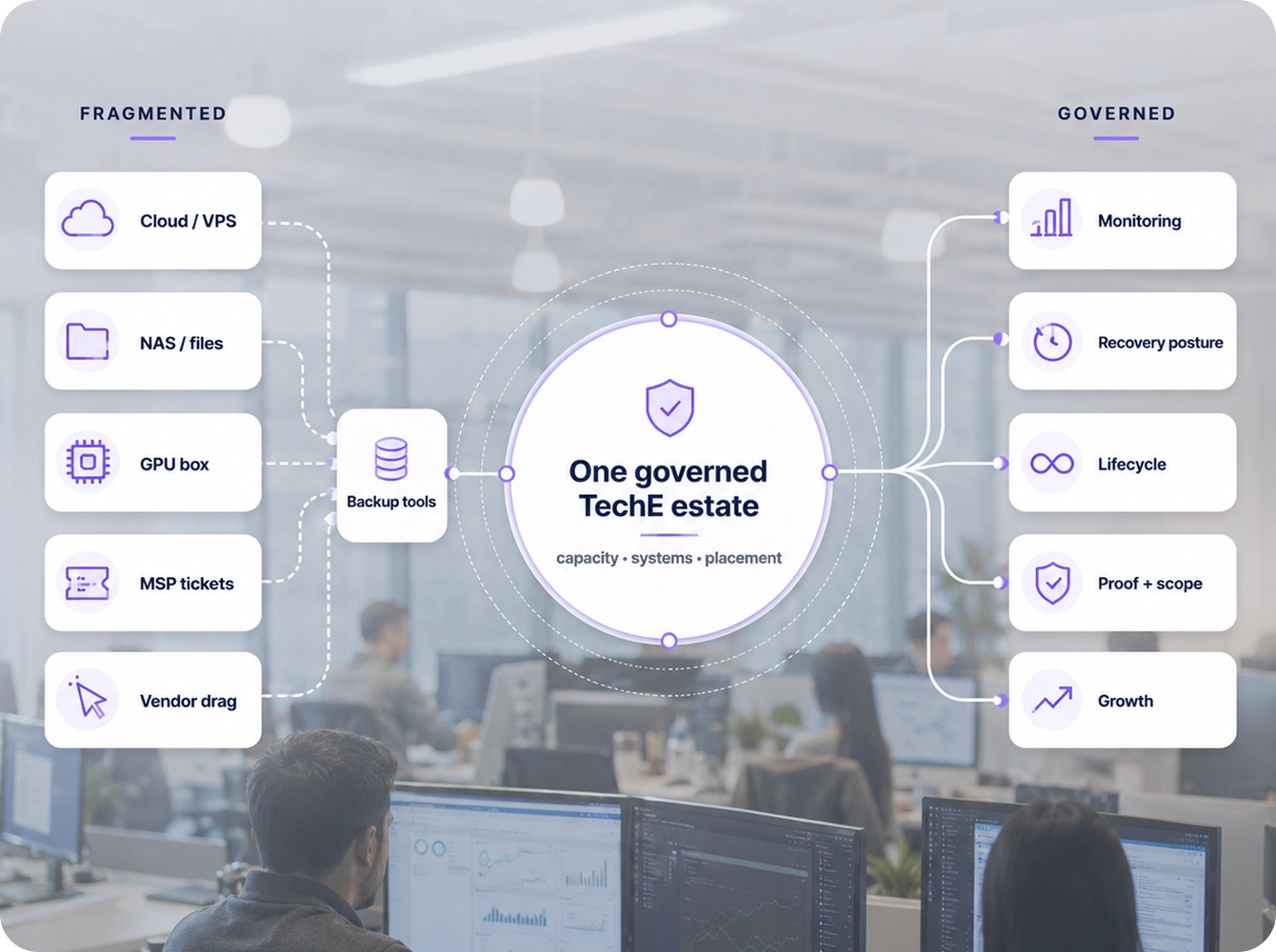
Stop stitching infra fragments

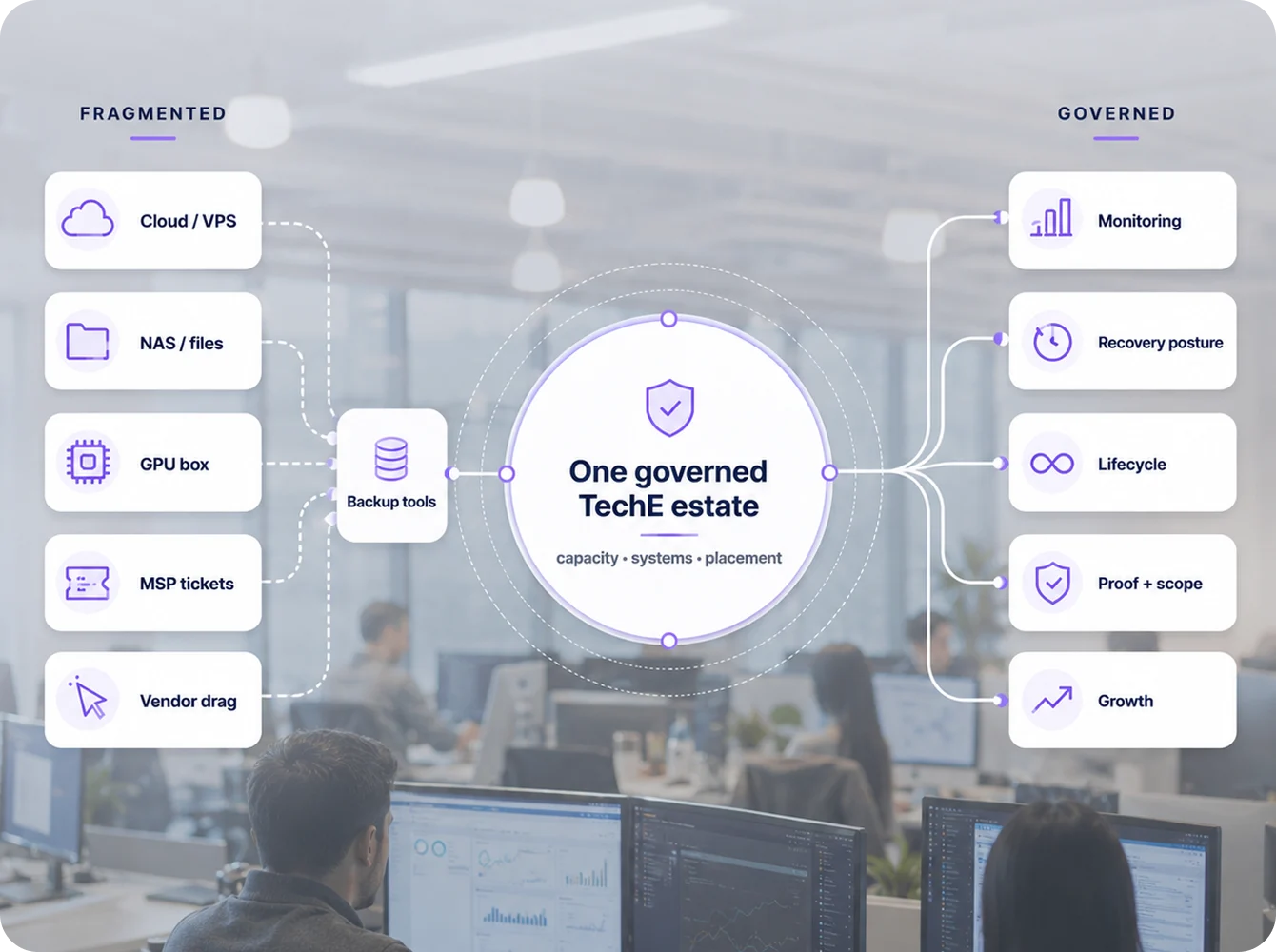
Stop stitching together cloud servers, hosting systems, NAS boxes, GPU machines, backup tools, and MSP tickets.

Your SMB does not need another isolated infrastructure decision. It needs a governed way to buy and operate capacity for real business workloads. You stop assembling infrastructure from fragments. Your AI, compute, storage, placement, monitoring, lifecycle, and recovery posture become one scalable TechE path.

What this page answers

Fragmented infrastructure becomes one governed TechE estate.

Stop stitching infra fragments

Stop stitching together cloud servers, hosting systems, NAS boxes, GPU machines, backup tools, and MSP tickets.

Your SMB does not need another isolated infrastructure decision. It needs a governed way to buy and operate capacity for real business workloads. You stop assembling infrastructure from fragments. Your AI, compute, storage, placement, monitoring, lifecycle, and recovery posture become one scalable TechE path.

Fragmented infrastructure consolidated into one governed estate

Random cloud / VPS / server choices

WHAT SOVEREIGN INFRA GIVES YOUR BUSINESS

Defined Host Units sized around your workloads.

Cloud bill without an infrastructure plan

WHAT SOVEREIGN INFRA GIVES YOUR BUSINESS

Capacity placed by workload, cost, recovery, latency, privacy, and scale.

GPU box, NAS, backup, and server decisions made separately

WHAT SOVEREIGN INFRA GIVES YOUR BUSINESS

Infra Engines and packs that combine compute, storage, AI, placement, monitoring, lifecycle, and recovery posture where scoped.

Monitoring added later

WHAT SOVEREIGN INFRA GIVES YOUR BUSINESS

Visibility, alerts, uptime, backup status, and service health where scoped.

Hardware buying becoming an IT department

WHAT SOVEREIGN INFRA GIVES YOUR BUSINESS

Purpose-built TechE engines and packs and managed operating paths instead of random hardware ownership.

What this page answers

Fragmented infrastructure becomes one governed TechE estate.

Where SMBs actually use this

Pick the path that looks likeyour business

Start with Host Units. Add Infra Engines and packs when ready.

Selected starting estate

Managed starter

Start with

10-20 Host Units; add Edge Engine or WorkDesk local engine only where local control is needed.

Price / Proof Path

Host Unit anchor: $250-USD 500/mo non-GPU example; local engine priced by configuration; request capacity sheet and spec.

Add next

Converged Hub / Server Unit path.

Office local depth

Start with

20 Host Units + Converged Hub / Server Unit where justified.

Price / Proof Path

20 Host Units = USD 500/mo non-GPU example; Converged Hub priced by configuration; request spec, validation, and deployment proof.

Add next

UNO.

Site system

Start with

UNO + Converged Hub / base system where scoped.

Price / Proof Path

Scoped site package; request UNO spec, site checklist, deployment video, and BOM review.

Add next

AI-ready high-capacity Infra Engine path.

Private AI depth

Start with

AI-ready Host Units + AI Host / high-capacity AI/server Infra Engine plus local AI desktop where useful.

Price / Proof Path

GPU/vRAM separate; request AI/GPU sizing review, benchmark report, thermal/power validation, and priced configuration.

Add next

Regional / hybrid expansion.

Hybrid estate

Start with

Regional Host Units + colocation + on-premise pack mix.

Price / Proof Path

Request estate assessment, placement diagram, BOM review, and phased rollout pricing.

Add next

Repeatable multi-site pattern.

See every business situation and buyer path

Use this and what it lets you do
  Use this What it lets you do
Solo founder / consultantO Shared TechE colo Host Units + Edge Engine / WorkDesk local engine Run private systems in TechE colo, keep small local AI / edge / desk-side control, and avoid buying a full rack.
Lawyer / accountant / professional office Host Units + Converged Hub / Server Unit where justified Run records, private apps, files, local processing, private AI/RAG-adjacent work, and supportable office infrastructure.
2-20 user office Host Units + Converged Hub / Server Unit now, UNO 12U later Move from shared files, cloud/VPS sprawl, and owner-managed IT into one repeatable TechE path.
Clinic / healthcare office Regional Host Units + Converged Hub / Server Unit / UNO where scoped Place workloads by privacy, region, local workflow, records, scanners, and compliance-readiness needs.
Warehouse / factory / site operation Edge Engine / WorkDesk local engine + Converged Hub / Server Unit + UNO 12U Handle local processing, site systems, devices, scanners, cameras, local workflows, and regional connectivity.
AI-heavy SMB AI-ready Host Units + high-capacity AI/server Infra Engine Run private AI, RAG, document intelligence, GPU-class workloads, compute, and storage depth.
Storage / data-heavy SMB Converged Hub / Server Unit or high-capacity AI/server Infra Engine depending on scale Run serious data, archive, business memory, AI-ready storage, retention, and evidence-heavy workloads.
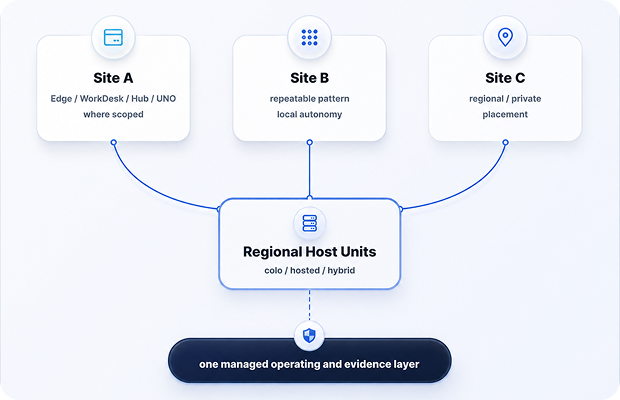
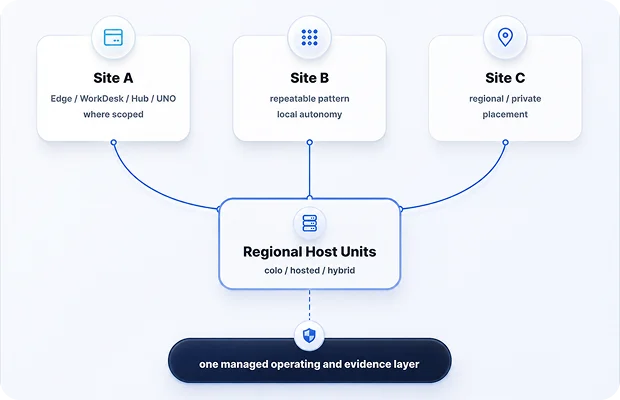
Multi-site business Regional Host Units + repeatable Edge Engine / WorkDesk local engine / Converged Hub / Server Unit / UNO / high-capacity AI/server Infra Engine pattern Repeat the same TechE infrastructure model across offices, regions, and on-prem / on-colo / hybrid placements.
What feels broken, start, add
next, and what they can do
  What feels broken Start with Add Next What they can do
Solo / SOHO Laptop, cloud folders, public AI, no real local control. Shared TechE colo Host Units + Edge Engine / WorkDesk local engine. Converged Hub / Server Unit or more hosted/private capacity. Private systems, small local AI, edge/local control, serious workspace without full rack.
2-20 User Office Shared files, apps, cloud/VPS sprawl, owner acting as IT. Host Units + optional Edge Engine / WorkDesk local engine / Converged Hub / Server Unit. UNO 12U Office apps, files, local services, private systems, local AI/RAG-adjacent work where scoped.
Clinic / Professional Office Records, scanners, privacy, workflow uncertainty, placement anxiety. Regional/private Host Units + Converged Hub / Server Unit where justified. UNO 12U Place workloads by privacy, region, data, local workflow, and compliance-readiness needs.
Warehouse / Factory / Branch Devices, cameras, scanners, local workflows, and site systems are fragmented. Edge Engine / WorkDesk local engine / Converged Hub / Server Unit. UNO 12U / multi-site estate. Local processing, site systems, edge roles, connectivity, repeatable site infrastructure.
Storage / Data-Heavy SMB Data growth, archives, records, business memory, AI-ready storage pressure. Converged Hub / Server Unit or regional Host Units. high-capacity AI/server Infra Engine. Structured data, AI-ready storage, archive, retention, heavy compute/storage paths where scoped.
AI-Heavy SMB Public AI/API spend, RAG need, GPU/vRAM question, private data concern. AI-ready Host Units or local AI desktop. high-capacity AI/server Infra Engine. Private AI, RAG, document intelligence, GPU-class workloads, local/colo/hybrid AI placement.
On-Prem Serious Site The site needs a complete infrastructure stack, not random boxes. UNO 12U + Converged Hub / Server Unit. high-capacity AI/server Infra Engine. Organized TechE system for local compute, storage, AI, operations, and expansion.
Multi-Site / Distributed SMB Every branch runs differently. Regional Host Units + repeatable Edge Engine / WorkDesk local engine / Converged Hub / Server Unit / UNO pattern. high-capacity AI/server Infra Engine / regional colo. One repeatable infrastructure model across sites, regions, on-prem, co-lo, and hybrid paths.

Start small. Add capacity. Build the estate.

One architecture from managed capacity to on-premise packs, colocation, and AI-ready infrastructure.

Scale by adding Host Units, Infra Engines, UNO systems, sites, regions, storage, AI/GPU, ARK depth, Maestro depth, service layers, colocation, and support depth - without rebuilding the model every time.

Why the operating pressure is rising
  Business moment What they buy What they can do now
Solo / Starter One serious operator wants private systems without buying a full stack. Shared TechE colo Host Units + Edge Engine / WorkDesk local engine. WorkDesk/private systems, small local AI, edge/local control, hosted capacity.
Local Depth The business needs more local processing, local data handling, and local AI/RAG-adjacent work. Converged Hub / Server Unit. Local compute, local storage, local apps, private data handling, local services, light AI/RAG-adjacent processing.
Team / Site Foundation The office, clinic, warehouse, or branch needs organized infrastructure. UNO 12U + Converged Hub / Server Unit / base system where scoped. Repeatable site system, organized power/network/compute/storage layers, managed deployment path.
Full AI / Compute / Storage The business needs serious private AI, compute, storage, document intelligence, RAG, or heavy workloads. high-capacity AI/server Infra Engine 6U inside UNO 12U or regional colo. Private AI, GPU-class workloads, heavy compute, large storage, Vault/archive/evidence paths where scoped.
Hybrid Estate The business has multiple sites, regions, or placement needs. Host Units + Edge Engine / WorkDesk local engine / Converged Hub / Server Unit / high-capacity AI/server Infra Engine / UNO mix. Regional colo + on-prem + on-colo + retained public cloud where justified under one managed model.

One system replaces the patchwork.

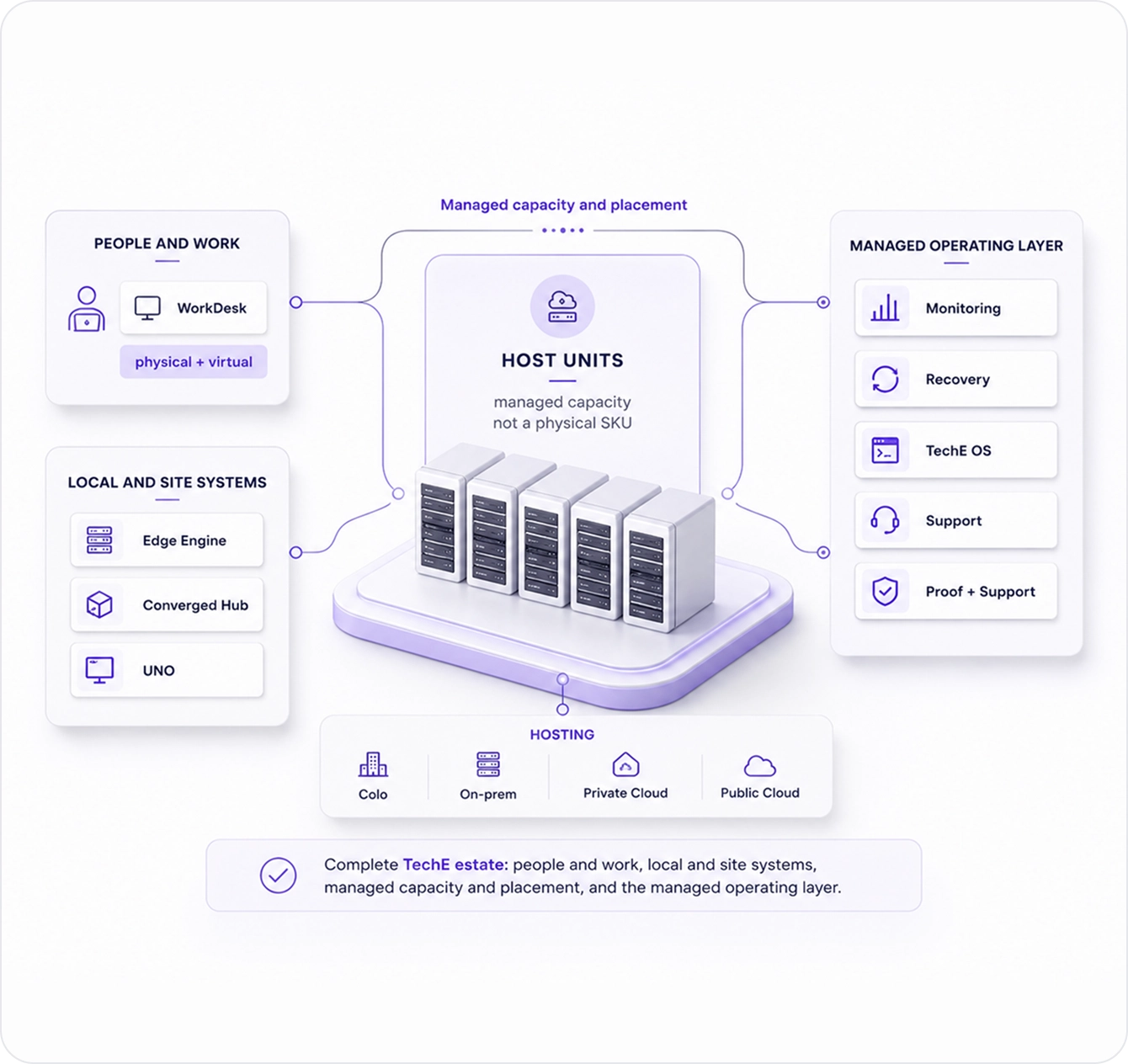
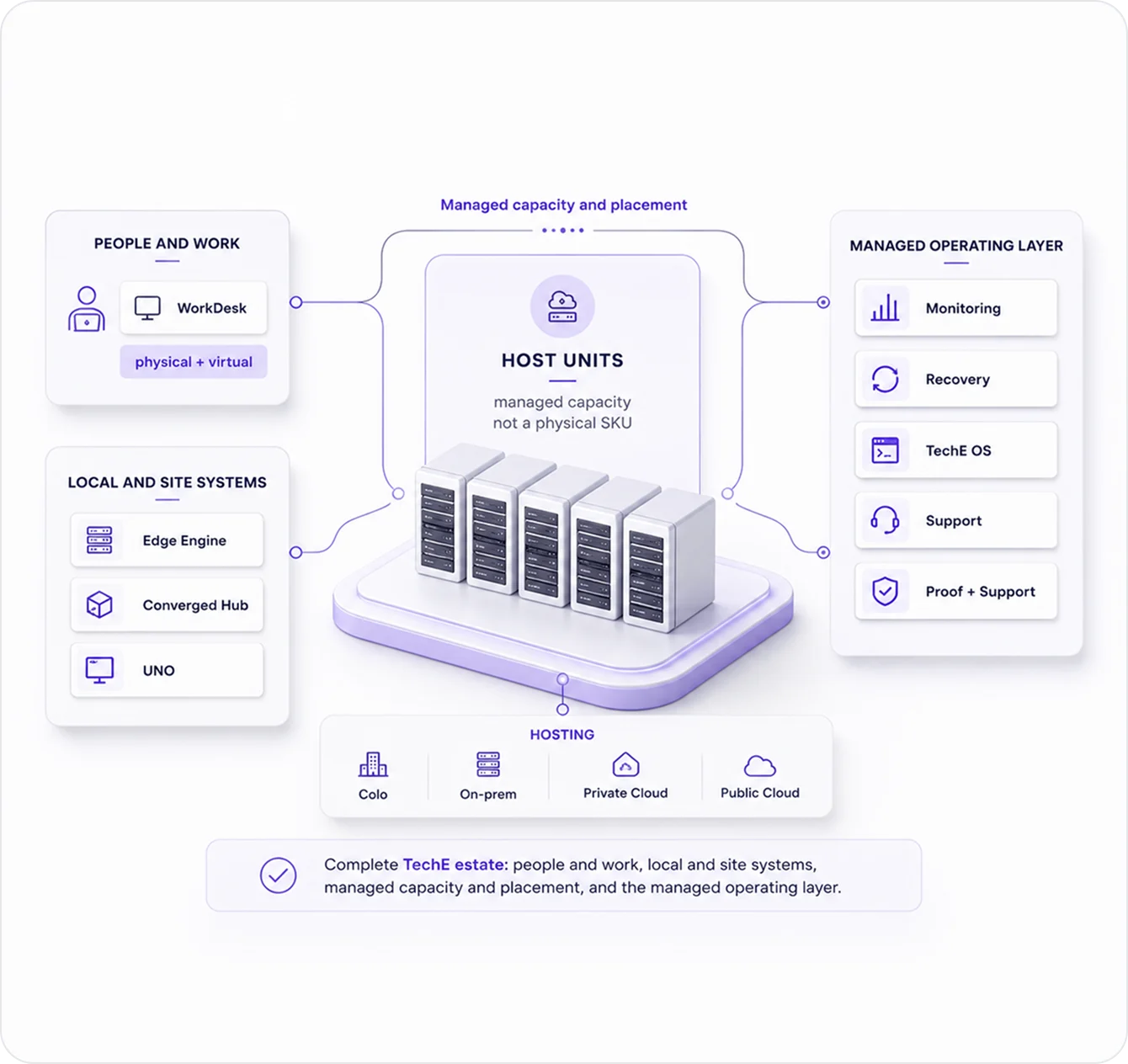
What you buy: Host Units, Infra Engines, colocation, and on-premise packs

The sellable infra model stays simple: Host Units measure managed capacity; Infra Engines deliver compute; the four on-premise SKU groups make the system understandable; colocation gives dedicated regional/private placement; on-premise packs make site infrastructure deployable; service layers make it managed.

Local AI desktop is separate. It is a desk / endpoint / local-AI path. It can connect to Sovereign Infra Hosting where scoped, but it is not part of the Host Unit + four on-premise SKU-group model.

Edge Engine · WorkDesk · Converged Hub / Server Unit · UNO

Host Units are the managed capacity. Infra Engines are the compute elements. The on-premise SKU groups and UNO package those engines into complete deployable SMB infrastructure systems.

Host Units Capacity

Infra Engines roles

Four families systems

Right-hosting placement

Packs deployable scope

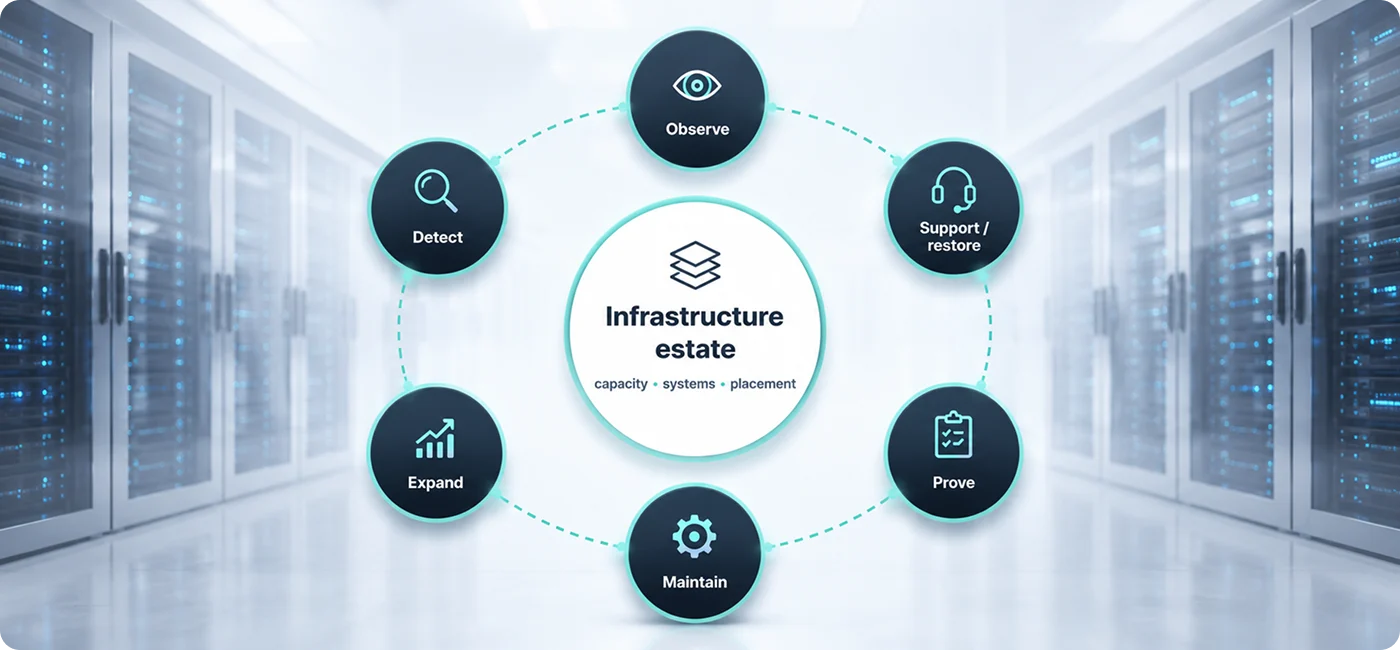
Operate prove approve

Current infrastructure is not the enemy. Ungoverned infrastructure is.

Plain-English definitions

Sovereign Infra Hosting

The managed infrastructure layer for SMB workloads.

Host Unit

The managed capacity measure used to price and size business workloads. It is not a raw VPS and not a physical server SKU.

Infra Engine

Any compute element that delivers Sovereign Infra capacity: Edge Engine, WorkDesk, Converged Hub, UNO-contained system, server, or rack-scale system.

Edge Engine

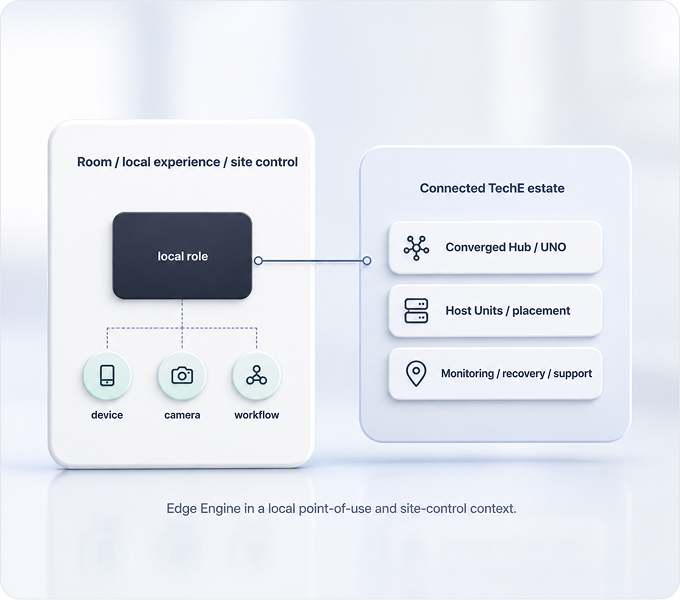
The room, local edge, local experience, small compute, entertainment/gaming, or site-control engine where scoped. SKU family 10.

WorkDesk

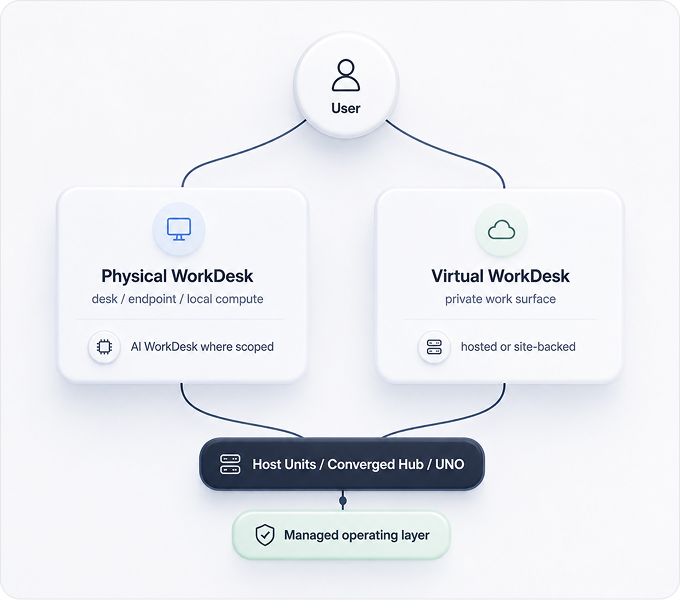
The user, desk, endpoint, virtual, physical, and local AI desktop engine path. SKU family 20.

Converged Hub / Server Unit

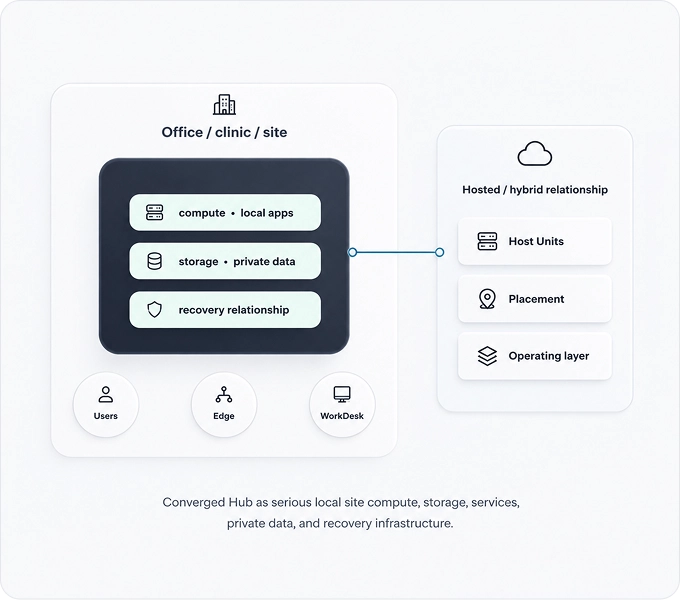
The site compute, storage, backup, local services, and SMB server infrastructure family. SKU family 30.

UNO

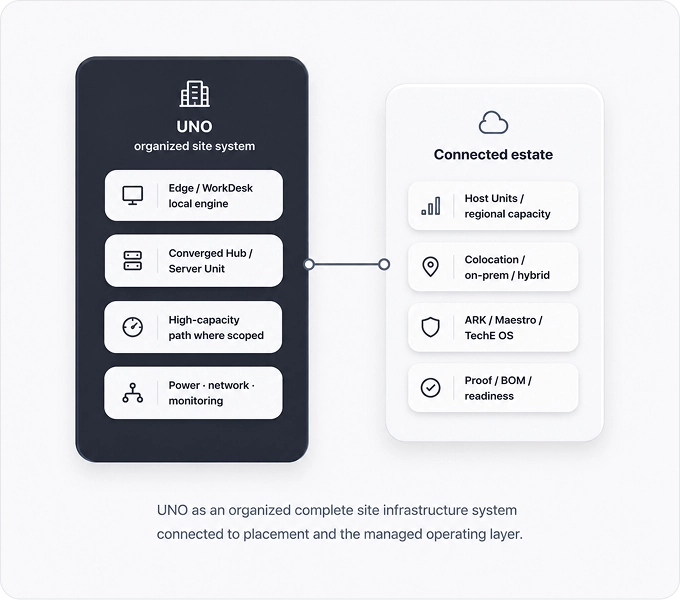
The private/site infrastructure cabinet and organized infrastructure system. SKU family 40.

AI capacity and sizing

AI sizing, GPU/vRAM, RAG, document intelligence, local AI desktop, AI-ready Host Units, and high-capacity AI/server capacity where scoped.

Colocation

Dedicated regional/private placement path for Host Units and Infra Engines. It is placement, not a separate product SKU unless separately defined.

On-premise pack

A buyer-ready on-site infrastructure package combining Host Units, Infra Engines, service scope, proof, and BOM.

Service layer

What TechE manages around the infrastructure: setup, monitoring, recovery, access, AI, lifecycle, support, and evidence.

Right-hosting

The placement method: hosted, colo, on-premise, public cloud where justified, or hybrid based on workload, recovery, cost, privacy, latency, and supportability.

One system replaces the patchwork.

What you buy: Host Units, Infra Engines, colocation, and on-premise packs

The sellable infra model stays simple: Host Units measure managed capacity; Infra Engines deliver compute; the four on-premise SKU groups make the system understandable; colocation gives dedicated regional/private placement; on-premise packs make site infrastructure deployable; service layers make it managed.

Local AI desktop is separate. It is a desk / endpoint / local-AI path. It can connect to Sovereign Infra Hosting where scoped, but it is not part of the Host Unit + four on-premise SKU-group model.

Edge Engine · WorkDesk · Converged Hub / Server Unit · UNO

Host Units are the managed capacity. Infra Engines are the compute elements. The on-premise SKU groups and UNO package those engines into complete deployable SMB infrastructure systems.

Host Units
Capacity

Infra Engines
roles

Four families
systems

Right-hosting
placement

Packs deployable scope

Operate prove
approve

Current infrastructure is not the enemy. Ungoverned infrastructure is.

Plain-English definitions

Sovereign Infra

The managed infrastructure layer for SMB workloads.

Host Unit

The managed capacity measure used to price and size business workloads. It is not a raw VPS and not a physical server SKU.

Infra Engine

Any compute element that delivers Sovereign Infra capacity: Edge Engine, WorkDesk, Converged Hub, UNO-contained system, server, or rack-scale system.

Edge Engine

The room, local edge, local experience, small compute, entertainment/gaming, or site-control engine where scoped. SKU family 10.

WorkDesk

The user, desk, endpoint, virtual, physical, and local AI desktop engine path. SKU family 20.

Converged Hub / Server Unit

The site compute, storage, backup, local services, and SMB server infrastructure family. SKU family 30.

UNO

The private/site infrastructure cabinet and organized infrastructure system. SKU family 40.

AI capacity and sizing

AI sizing, GPU/vRAM, RAG, document intelligence, local AI desktop, AI-ready Host Units, and high-capacity AI/server capacity where scoped.

Colocation

Dedicated regional/private placement path for Host Units and Infra Engines. It is placement, not a separate product SKU unless separately defined.

On-premise pack

A buyer-ready on-site infrastructure package combining Host Units, Infra Engines, service scope, proof, and BOM.

Service layer

What TechE manages around the infrastructure: setup, monitoring, recovery, access, AI, lifecycle, support, and evidence.

Right-hosting

The placement method: hosted, colo, on-premise, public cloud where justified, or hybrid based on workload, recovery, cost, privacy, latency, and supportability.

Host Units are the managed capacity layer

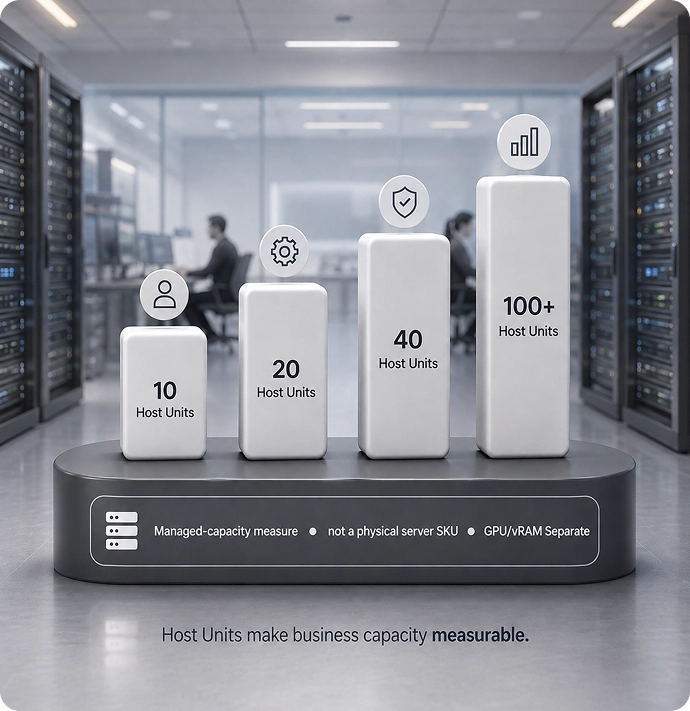
Host Units make business capacity measurable

Host Units are the managed capacity layer; Infra Engines, on-premise SKU groups, colocation, and packs are how that capacity becomes deployable. A Host Unit is the atomic managed-capacity measure inside Sovereign Infra Hosting. It is not a generic VPS, not raw EC2-style compute, and not a physical server SKU.

What it is

Managed capacity measure and commercial hosting unit.

Use it when

You want TechE-managed capacity before buying hardware, or you need regional/private capacity.

What it can run / support

WorkDesk backend, apps, private systems, AI/RAG, storage, regional workloads, and scoped operating capacity.

Example capacity

Why the operating pressure is rising

How Sovereign Infra helps

WorkDesk backend

Capacity for hosted/private user work surfaces and daily business access.

Files / records / storage

Structured storage and business memory capacity.

Local AI / edge AI

Local processing, small-model support, AI-adjacent services, and edge control where scoped.

Site processing

Local workloads for clinics, warehouses, factories, offices, scanners, devices, cameras, workflows, or branches where scoped.

Operating recovery / continuity

Restore path, retention, recovery capacity, DR posture, and evidence where scoped.

On-prem / on-colo infrastructure

Host Units can run on TechE-standard on-prem, on-colo, or client-owned systems where local ownership or strategic placement justifies it.

Business apps

Runtime for private systems, portals, tools, and internal apps.

Private AI / RAG

Document intelligence, model routing, GPU/vRAM where scoped, and approved private data paths.

Compute / storage

Combined compute, storage, AI, and workload runtime capacity on Edge Engine / WorkDesk local engine, Converged Hub / Server Unit, high-capacity AI/server Infra Engine, or UNO patterns.

Workflow systems

Forms, tasks, dashboards, automation, and business process tools.

Regional workloads

Capacity near users, data, sites, privacy, region, or compliance/locality needs.

Host Units are the managed capacity layer

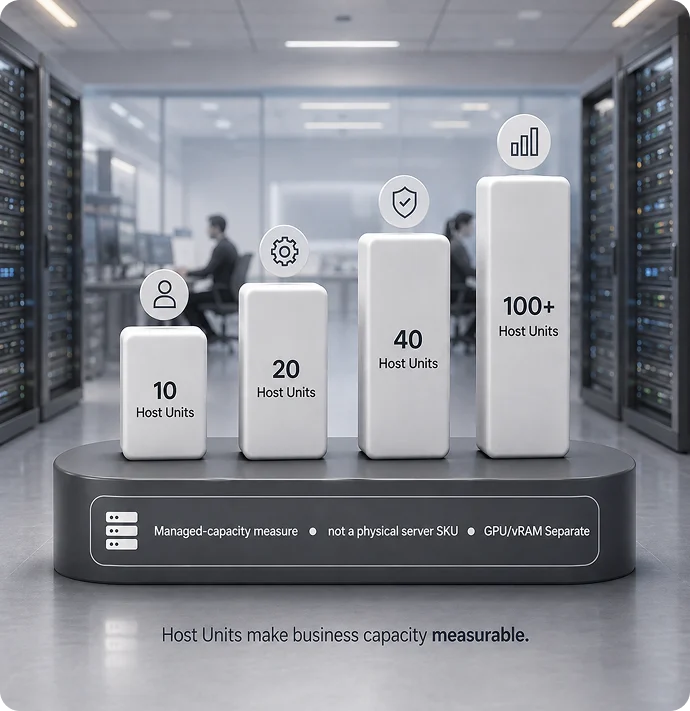
Host Units make business capacity measurable

Host Units are the managed capacity layer; Infra Engines, on-premise SKU groups, colocation, and packs are how that capacity becomes deployable. A Host Unit is the atomic managed-capacity measure inside Sovereign Infra. It is not a generic VPS, not raw EC2-style compute, and not a physical server SKU.

CPU

2 vCores

RAM

4 GB

Fast storage

16 GB PCIe Gen4 NVMe

Bulk storage

32 GB SSD / HDD

GPU option

+8 GB vRAM where scoped; GPU/vRAM pricing separate

Commercial anchor

$25 per non-GPU Host Unit example anchor

What it is

Managed capacity measure and commercial hosting unit.

Use it when

You want TechE-managed capacity before buying hardware, or you need regional/private capacity.

What it can run / support

WorkDesk backend, apps, private systems, AI/RAG, storage, regional workloads, and scoped operating capacity.

TechE Host Unit infrastructure model

Example capacity

10 Host Units

Monthly Non-GPU Anchor

$250/month

vCores

20

RAM

40 GB

Gen4 NVMe

160 GB

SSD/HDD

320 GB

20 Host Units

Monthly Non-GPU Anchor

USD 500/month

vCores

40

RAM

80 GB

Gen4 NVMe

320 GB

SSD/HDD

640 GB

40 Host Units

Monthly Non-GPU Anchor

$1,000/month

vCores

80

RAM

160 GB

Gen4 NVMe

640 GB

SSD/HDD

1.28 TB

100 Host Units

Monthly Non-GPU Anchor

$2,500/month

vCores

200

RAM

400 GB

Gen4 NVMe

1.6 TB

SSD/HDD

3.2 TB

Use Sovereign Infra for real SMB workloads

SMB workload

How Sovereign Infra helps

WorkDesk backend

Capacity for hosted/private user work surfaces and daily business access.

Files / records / storage

Structured storage and business memory capacity.

Local AI / edge AI

Local processing, small-model support, AI-adjacent services, and edge control where scoped.

Site processing

Local workloads for clinics, warehouses, factories, offices, scanners, devices, cameras, workflows, or branches where scoped.

Operating recovery / continuity

Restore path, retention, recovery capacity, DR posture, and evidence where scoped.

On-prem / on-colo infrastructure

Host Units can run on TechE-standard on-prem, on-colo, or client-owned systems where local ownership or strategic placement justifies it.

Business apps

Runtime for private systems, portals, tools, and internal apps.

Private AI / RAG

Document intelligence, model routing, GPU/vRAM where scoped, and approved private data paths.

Compute / storage

Combined compute, storage, AI, and workload runtime capacity on Edge Engine / WorkDesk local engine, Converged Hub / Server Unit, high-capacity AI/server Infra Engine, or UNO patterns.

Workflow systems

Forms, tasks, dashboards, automation, and business process tools.

Regional workloads

Capacity near users, data, sites, privacy, region, or compliance/locality needs.

Four families

Why purpose-built Infra Engines and packs beat random hardware

Assessment, migration, onboarding, support, lifecycle and optimization make the architecture real.

family 10

Edge Engine 10

site edge
wan continuity
local cache
support path
What it is

Room/local edge/local experience compute engine.

Use it when

You need room, edge, entertainment/gaming, local experience, small site-control, or local edge capability where scoped.

What it can run / support

Local edge roles, secure local control, experience systems, demo/pilot workloads, and small-site roles.

Buyer action

Configure Edge Engine.

family 20

WorkDesk 20

Desk + team
local ai
private work
managed operation
What it is

User/desk/endpoint work engine, virtual or physical, including local AI desktop where scoped.

Use it when

You need managed work surfaces, endpoint compute, desk-local AI, or controlled workspace access.

What it can run / support

WorkDesk, local endpoint compute, approved apps, local AI desktop, private workspace, and RAG front-end access where scoped.

Buyer action

Configure WorkDesk.

family 30

Converged Hub / Server Unit 30

site compute
storage
virtualisation
recovery
What it is

Site compute, storage, backup, local services, and SMB server infrastructure.

Use it when

Your office or site needs local compute, local storage, apps, private data handling, recovery cache, or first serious infrastructure.

What it can run / support

Apps, files, local services, compute-storage, branch/site workloads, recovery, and AI-adjacent work where scoped.

Buyer action

Configure Converged Hub.

family 40

12U UNO

power
network
compute + storage
expansion
What it is

Private/site infrastructure cabinet and organized system.

Use it when

A site, office, clinic, warehouse, or branch needs a complete organized TechE infrastructure stack.

What it can run / support

Packages Infra Engines, power, network, local services, monitoring, and deployment structure where scoped.

Buyer action

Build UNO.

Colocation

On-premise packs

AI capacity and sizing

Local AI desktop is separate and is not another product family.

What it is

AI sizing and managed AI capacity path.

Use it when

You need RAG, document intelligence, private AI, GPU/vRAM sizing, or AI Host capacity.

What it can run / support

24GB SFF professional GPU-class and above where scoped; 8GB vRAM remains Host Unit option only.

Local AI desktop

Endpoint And Local AI Desk Path.

AI-ready Host Units

Managed AI-ready capacity where useful.

High-capacity AI/server Infra Engine

Private AI, GPU-class workloads, serious compute and storage where scoped.

Validated relationship: workload → private data → compute → GPU/vRAM → storage → placement → power/thermal → proof.

Four families. Distinct roles. One governed estate

Why purpose-built Infra Engines and packs beat random hardware

Colocation

What it is

Dedicated regional/private placement path.

Use it when

The workload needs facility, region, privacy, latency, recovery, data-control, or dedicated capacity advantages.

What it can run / support

Host Units, AI Host capacity, storage/recovery, private systems, and larger Infra Engine placement where scoped.

Buyer action

Request placement review.

On-premise packs

What it is

Buyer-ready site packages combining Host Units, Infra Engines, service scope, proof, and BOM.

Use it when

The business wants a deployable local/site system, not a random box purchase.

What it can run / support

Office/site infra, local control, recovery posture, AI-ready local services, and branch/site operations.

Buyer action

Request on-premise pack BOM.

AI capacity and sizing

Local AI desktop is separate and is not another product family.

What it is

AI sizing and managed AI capacity path.

Use it when

You need RAG, document intelligence, private AI, GPU/vRAM sizing, or AI Host capacity.

What it can run / support

24GB SFF professional GPU-class and above where scoped; 8GB vRAM remains Host Unit option only.

Buyer action

Request AI/GPU sizing.

Local AI desktop

Endpoint and local AI desk path.

AI-ready Host Units

Managed AI-ready capacity where useful.

High-capacity AI/server Infra Engine

Private AI, GPU-class workloads, serious compute and storage where scoped.

Validated relationship: workload → private data → compute → GPU/vRAM → storage → placement → power/thermal → proof.

Placement and regions

The implementation can vary. The management model stays governed by TechE.

Availability depends on workload, region, partner availability, and approved commercial scope.

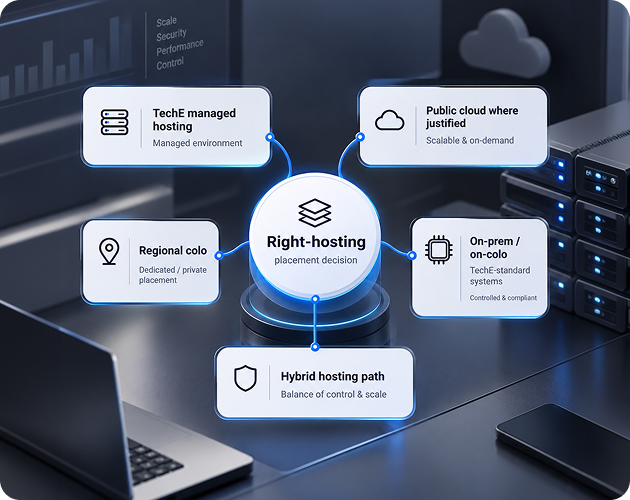
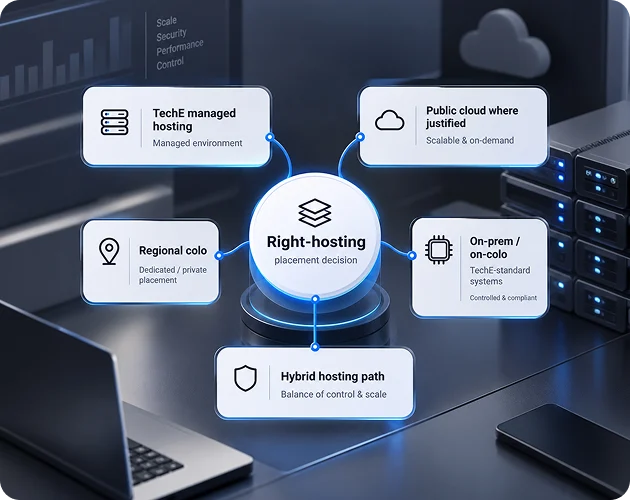
Right hosting

TechE managed hosting

Use it when You want TechE-managed capacity without choosing AWS, Azure, colo, or office servers yourself.

Right hosting

Regional colo
Host Units

Use it when You need capacity in a specific region for data control, latency, privacy, recovery, or compliance-readiness.

Right hosting

AWS / Azure / GCP where justified

Use it when a public cloud service is genuinely the right fit for burst, client requirement, cloud-native tools, or specialized services.

Right hosting

On-prem / on-colo TechE-standard systems where justified

Use it when A standardized TechE system should run at your office, site, or private colo because of local usage, data control, AI workload, recovery, continuity, or sovereignty.

Right hosting

Hybrid hosting path

Use it when Regional hosting, on-prem systems, private colo, retained cloud, and AI capacity need to work as one managed path.

Placement and regions

The implementation can vary. The management model stays governed by TechE.

Availability depends on workload, region, partner availability, and approved commercial scope.

Right hosting

TechE managed hosting

Use it when You want TechE-managed capacity without choosing AWS, Azure, colo, or office servers yourself.

Right hosting

Regional colo Host Units

Use it when You need capacity in a specific region for data control, latency, privacy, recovery, or compliance-readiness.

Right hosting

AWS / Azure / GCP where justified

Use it when a public cloud service is genuinely the right fit for burst, client requirement, cloud-native tools, or specialized services.

Right hosting

On-prem / on-colo TechE-standard systems where justified

Use it when A standardized TechE system should run at your office, site, or private colo because of local usage, data control, AI workload, recovery, continuity, or sovereignty.

Right hosting

Hybrid hosting path

Use it when Regional hosting, on-prem systems, private colo, retained cloud, and AI capacity need to work as one managed path.

USA

Buyer meaning

US placement, North America operations, recovery, privacy, and data-control needs.

Canada

Buyer meaning

Canada regional placement.

Europe

Buyer meaning

Europe / EU-aligned placement.

India

Buyer meaning

India regional placement for latency, local operations, and data-control needs.

Middle East

Buyer meaning

Middle East regional placement.

Australia

Buyer meaning

Australia / Oceania placement.

How does the estate grow?

Scale path: Host Units to on-premise packs without rebuilding the model

Local Depth

Site gains local apps, files, local processing, private data handling, and local AI/RAG-adjacent services.

Built from

Additional Converged Hub / Server Unit + ARK + Maestro where scoped.

Placement

Local site capacity linked with regional Host Units where useful.

Local Depth

SOHO / Desk Engine

One serious operator or micro-office gets local AI/control plus hosted capacity.

Built from

Edge Engine / WorkDesk local engine + Host Units + WorkDesk where scoped.

Placement

TechE managed hosting plus local Edge Engine / WorkDesk where needed.

Local Depth

Foundation Site

A site gets first serious local infrastructure.

Built from

Converged Hub / Server Unit + Host Units + ARK / Maestro where scoped.

Placement

On-premise, on-colo, or regional Host Units based on the site requirement.

Local Depth

Heavy AI / Compute / Storage

Site or colo adds private AI, heavy compute, large storage, RAG/document intelligence, Vault, archive, evidence, and GPU-class workloads where scoped.

Built from

high-capacity AI/server Infra Engine.

Placement

On-premise, on-colo, regional colocation, or hybrid based on data, power, thermal, privacy, latency, and supportability.

Local Depth

UNO 12U System

A site becomes a complete organized TechE infrastructure system.

Built from

UNO 12U packaging Edge Engine / WorkDesk local engine / Converged Hub / Server Unit / high-capacity AI/server Infra Engine where scoped.

Placement

On-premise or on-colo organized site system linked with regional Host Units where useful.

Local Depth

Hybrid Estate

Local site capacity links with regional/hosted capacity.

Built from

UNO + regional Host Units + cloud where justified.

Placement

UNO / local systems + regional Host Units + public cloud where justified.

Local Depth

Multi-Site Estate

Branches, offices, clinics, warehouses, or franchises repeat the same model.

Built from

Repeated Infra Engine / UNO patterns + regional Host Units.

Placement

Repeated site systems + regional Host Units / colocation under one managed model.

Local Depth

Different Placement. One Managed plane.

The implementation can vary while the operating model stays governed.

Capacity grows in governed steps

Start with placement, then add physical depth only where justified.

Infrastructure scale path

How does the estate grow?

Scale path: Host Units to on-premise packs without rebuilding the model

Local Depth

Site gains local apps, files, local processing, private data handling, and local AI/RAG-adjacent services.

Built from

Additional Converged Hub / Server Unit + ARK + Maestro where scoped.

Placement

Local site capacity linked with regional Host Units where useful.

Local Depth

SOHO / Desk Engine

One serious operator or micro-office gets local AI/control plus hosted capacity.

Built from

Edge Engine / WorkDesk local engine + Host Units + WorkDesk where scoped.

Placement

TechE managed hosting plus local Edge Engine / WorkDesk where needed.

Local Depth

Foundation Site

A site gets first serious local infrastructure.

Built from

Converged Hub / Server Unit + Host Units + ARK / Maestro where scoped.

Placement

On-premise, on-colo, or regional Host Units based on the site requirement.

Local Depth

Heavy AI / Compute / Storage

Site or colo adds private AI, heavy compute, large storage, RAG/document intelligence, Vault, archive, evidence, and GPU-class workloads where scoped.

Built from

high-capacity AI/server Infra Engine.

Placement

On-premise, on-colo, regional colocation, or hybrid based on data, power, thermal, privacy, latency, and supportability.

Local Depth

UNO 12U System

A site becomes a complete organized TechE infrastructure system.

Built from

UNO 12U packaging Edge Engine / WorkDesk local engine / Converged Hub / Server Unit / high-capacity AI/server Infra Engine where scoped.

Placement

On-premise or on-colo organized site system linked with regional Host Units where useful.

Local Depth

Hybrid Estate

Local site capacity links with regional/hosted capacity.

Built from

UNO + regional Host Units + cloud where justified.

Placement

UNO / local systems + regional Host Units + public cloud where justified.

Local Depth

Multi-Site Estate

Branches, offices, clinics, warehouses, or franchises repeat the same model.

Built from

Repeated Infra Engine / UNO patterns + regional Host Units.

Placement

Repeated site systems + regional Host Units / colocation under one managed model.

Local Depth

Different Placement. One Managed plane.

The implementation can vary while the operating model stays governed.

Regional

Managed Capacity

Private

Controlled Estate

Colocation

Dedicated Depth

On-Premise

Local systems

Hybrid

Right Mix

Managed Plane

One operating path

Capacity grows in governed steps

Start with placement, then add physical depth only where justified.

Host Unit

Managed Capacity

Edge / WorkDesk

Local role

Converged Hub

Site Depth

On-Premise

Local systems

UNO

Complete Site

Multi-site

Regional estate

Raw cloud comparison

Raw cloud gives resources. Sovereign Infra gives an operating path.

The correct comparison is not EC2 CPU/RAM price vs Host Unit price. Compare raw cloud plus operations, monitoring, support, lifecycle, recovery posture, and governance against managed capacity plus a scoped TechE operating path.

What TechE manages around the infrastructure
  What it includes Why it matters
Capacity Host Units, compute, storage, AI/GPU/vRAM where scoped, and system capacity across Infra Engines, colocation, on-premise packs, and UNO. Capacity becomes measurable, placeable, and scalable.
Placement TechE-managed hosting, regional colocation, private colocation, on-premise, public cloud where justified, or hybrid. Systems run where they make business sense.
Monitoring / Maestro Alerts, uptime, service health, visibility, reporting where scoped. Hidden failure becomes visible.
Recovery posture / ARK Restore path, retention, DR, evidence, and continuity design where scoped. Recovery becomes part of the infrastructure operating model, not a separate tool decision.
TechE OS Users, systems, inventory, lifecycle, governance, operating records. Infrastructure drift becomes governed.
Support path Response model, escalation, maintenance scope. The SMB stops coordinating every vendor separately.
Raw cloud / DIY questions
  Sovereign Infra answer
What CPU/RAM/storage do I rent? What business workload must run, where, under what operating scope, and with what proof?
Who designs the architecture? TechE maps capacity, placement, operating layer, proof, and scope.
Who monitors it? Maestro / monitoring scope where approved.
Who thinks through recovery posture? ARK / recovery posture where approved.
Who keeps it lifecycle-aware? TechE OS / operating records / support scope where approved.
Random hardware paths
  What happens TechE path
Buy a GPU box One AI problem may improve, but power, cooling, drivers, data placement, security, lifecycle, and support remain. Route through Edge Engine / WorkDesk local engine, Converged Hub / Server Unit, high-capacity AI/server Infra Engine, local AI desktop, or regional AI-ready Host Units.
Buy a NAS, mini server, or GPU box for one isolated need You may solve one problem but create another island of power, cooling, storage, drivers, lifecycle, monitoring, and support. Route the role through Edge Engine / WorkDesk local engine, Converged Hub / Server Unit, high-capacity AI/server Infra Engine, UNO, Host Units, or local AI desktop based on the scale path.
Rent raw cloud Capacity arrives fast, but architecture, monitoring, lifecycle, recovery posture, and AI cost control remain your problem. Use Host Units and placement strategy.
Depend only on MSP tickets Someone responds, but the infrastructure may remain fragmented. Use defined engines and packs, scope, proof, and operating records.

Managed does not mean unlimited. Operating scope is defined before claims are made.

Responsibility is explicit before scope is approved.

Raw cloud comparison

Raw cloud gives resources. Sovereign Infra gives an operating path.

The correct comparison is not EC2 CPU/RAM price vs Host Unit price. Compare raw cloud plus operations, monitoring, support, lifecycle, recovery posture, and governance against managed capacity plus a scoped TechE operating path.

Infrastructure control and operating model
What TechE manages around the infrastructure
  What it includes Why it matters
Capacity Host Units, compute, storage, AI/GPU/vRAM where scoped, and system capacity across Infra Engines, colocation, on-premise packs, and UNO. Capacity becomes measurable, placeable, and scalable.
Placement TechE-managed hosting, regional colocation, private colocation, on-premise, public cloud where justified, or hybrid. Systems run where they make business sense.
Monitoring / Maestro Alerts, uptime, service health, visibility, reporting where scoped. Hidden failure becomes visible.
Recovery posture / ARK Restore path, retention, DR, evidence, and continuity design where scoped. Recovery becomes part of the infrastructure operating model, not a separate tool decision.
TechE OS Users, systems, inventory, lifecycle, governance, operating records. Infrastructure drift becomes governed.
Support path Response model, escalation, maintenance scope. The SMB stops coordinating every vendor separately.
Raw cloud / DIY questions
  Sovereign Infra answer
What CPU/RAM/storage do I rent? What business workload must run, where, under what operating scope, and with what proof?
Who designs the architecture? TechE maps capacity, placement, operating layer, proof, and scope.
Who monitors it? Maestro / monitoring scope where approved.
Who thinks through recovery posture? ARK / recovery posture where approved.
Who keeps it lifecycle-aware? TechE OS / operating records / support scope where approved.
Random hardware paths
  What happens TechE path
Buy a GPU box One AI problem may improve, but power, cooling, drivers, data placement, security, lifecycle, and support remain. Route through Edge Engine / WorkDesk local engine, Converged Hub / Server Unit, high-capacity AI/server Infra Engine, local AI desktop, or regional AI-ready Host Units.
Buy a NAS, mini server, or GPU box for one isolated need You may solve one problem but create another island of power, cooling, storage, drivers, lifecycle, monitoring, and support. Route the role through Edge Engine / WorkDesk local engine, Converged Hub / Server Unit, high-capacity AI/server Infra Engine, UNO, Host Units, or local AI desktop based on the scale path.
Rent raw cloud Capacity arrives fast, but architecture, monitoring, lifecycle, recovery posture, and AI cost control remain your problem. Use Host Units and placement strategy.
Depend only on MSP tickets Someone responds, but the infrastructure may remain fragmented. Use defined engines and packs, scope, proof, and operating records.

Managed does not mean unlimited. Operating scope is defined before claims are made.

Responsibility is explicit before scope is approved.

01

TechE manages where scoped

Setup, capacity, placement, monitoring, recovery posture, secure access, lifecycle, support, operating records, and evidence.

02

Buyer provides and approves

Users, workloads, data, AI need, region, privacy, latency, site requirements, commercial priorities, and operating expectations.

03

Site / partner dependent

Facility, power, network, site readiness, field service, remote hands, regional partner availability, and approved local coverage.

04

Not automatically included

HA/DR guarantees, certification, fixed recovery objectives, field service, GPU performance, unlimited support, or availability claims without explicit architecture, budget, validation, and acceptance.

How you start

Pick the need. Pick the path. See proof. Approve scope. Deploy.

Proof below is shown as a required configuration or approval output unless a live route is separately published.

Buyer inputs

TechE outputs

Proof + price

Approve

Deploy

Operate

Add next

Buyer inputs and TechE outputs
  You provide TechE output
Business + workload intake Users, apps, data, AI/RAG, region, local processing, site needs, current cloud/server state. Initial Sovereign Infra path assessment.
Starting path choice Solo, office, clinic, warehouse, AI-heavy, storage/data-heavy, on-prem serious site, or multi-site estate. Recommended starting path: Host Units, Edge Engine / WorkDesk local engine, Converged Hub / Server Unit, local AI desktop, UNO 12U, high-capacity AI/server Infra Engine, or phased path.
Capacity estimate What needs to run now and what may scale later. Host Unit estimate and SKU/bundle direction.
Placement decision Privacy, latency, data location, cost, ownership, site/region needs. TechE managed hosting / regional colo / AWS-Azure-GCP where justified / on-prem-on-colo / hybrid path.
Operating scope Monitoring, recovery, lifecycle, support expectations. ARK / Maestro / TechE OS scope where approved.
Approval Commercial and operating priorities. Approved scope and rollout path.
Operate and expand New workloads, capacity growth, AI/GPU needs, recovery depth. Add Host Units, add Edge Engine / WorkDesk local engine / Converged Hub / Server Unit / high-capacity AI/server Infra Engine, package into UNO 12U, add regions, add AI/GPU depth, and deepen managed scope where approved.
Buying styles
  What happens next Output
Design My Hosting Path TechE reviews users, workloads, data, AI need, region, and placement preference. Recommended Host Unit / Infra Engine / colocation / on-premise pack / local AI desktop path.
Configure Edge Engine / WorkDesk / Converged Hub / UNO path Buyer reviews the right product family and proof assets. Draft SKU/BOM configuration and scoped options.
Request colocation placement review TechE reviews region, facility, privacy, latency, AI/storage, recovery, and dedicated capacity need. Colocation placement path and capacity recommendation.
Request on-premise pack BOM TechE maps the site requirement into Host Units, Infra Engines, service layers, and proof assets. Pack BOM, exclusions, validation requirements, and rollout path.
Request Priced Configuration / BOM Review TechE turns the selected path into a quoted scope. Priced configuration, exclusions, proof assets, and approval path.
Deploy / operate / expand Approved scope moves into delivery and lifecycle. Managed operating path with expansion route.
Best next step

I need managed capacity without buying hardware first

Design My Hosting Path

I need small local AI / edge / desk-side control

WorkDesk local engine

I need local SMB infrastructure for office/site workloads

Configure Converged Hub / Server Unit

I need full AI / compute / storage depth

Configure high-capacity AI/server Infra Engine

I need a complete office/site infrastructure system

Build UNO 12U

I need desk/local endpoint AI

Explore local AI desktop

I need regional or private placement

Book AI-Ready Infra Discovery

I need to see proof before approval

Request proof-state review

I need pricing or a phased rollout

Request Priced Configuration

I need estate assessment

Book Infrastructure Review

Who operates the model

Technology systems need an accountable operating philosophy

Review the TechE company, method, operating centers, and commitment behind the infrastructure path.

Complete need-to-next-step map
  TechE answer Immediate next step
Managed capacity without buying hardware first Host Units Design My Hosting Path
Desk / user / local endpoint path Desk / user / local endpoint path Configure WorkDesk path
Room / small local edge / experience path Edge Engine Configure Edge Engine path
Real local infrastructure for an office or site Converged Hub / Server Units Configure Converged Hub path
Complete organized site system UNO Build UNO path
Dedicated regional / private placement Colocation Request placement review
Buyer-ready site deployment On-premise pack Request on-premise pack BOM

Servers & Hardware

Purpose-built servers and hardware for governed SMB infrastructure

Edge Engine, Converged Hub, Server Unit and UNO paths for local, on-premise and colocated capacity, with storage and GPU-class options where the workload requires them.

Choose the right Infra Engine, on-premise pack, Host Unit capacity, storage, AI/GPU and placement path without turning hardware procurement into another unmanaged island.

When workloads become physical, TechE has standard blocks. Hardware enters when control, locality, AI, storage, recovery, ownership, site operations or scale justifies it.
TechE sovereign infrastructure architecture

Start small. Add capacity. Build the estate.

A clear hardware scale path from desk and site systems to rack-scale infrastructure.

Scale by adding Host Units, Infra Engines, UNO systems, sites, regions, storage, AI/GPU, ARK depth, Maestro depth, service layers, colocation, and support depth - without rebuilding the model every time.

Why the operating pressure is rising
  Business moment What they buy What they can do now
Solo / Starter One serious operator wants private systems without buying a full stack. Shared TechE colo Host Units + Edge Engine / WorkDesk local engine. WorkDesk/private systems, small local AI, edge/local control, hosted capacity.
Local Depth The business needs more local processing, local data handling, and local AI/RAG-adjacent work. Converged Hub / Server Unit. Local compute, local storage, local apps, private data handling, local services, light AI/RAG-adjacent processing.
Team / Site Foundation The office, clinic, warehouse, or branch needs organized infrastructure. UNO 12U + Converged Hub / Server Unit / base system where scoped. Repeatable site system, organized power/network/compute/storage layers, managed deployment path.
Full AI / Compute / Storage The business needs serious private AI, compute, storage, document intelligence, RAG, or heavy workloads. high-capacity AI/server Infra Engine 6U inside UNO 12U or regional colo. Private AI, GPU-class workloads, heavy compute, large storage, Vault/archive/evidence paths where scoped.
Hybrid Estate The business has multiple sites, regions, or placement needs. Host Units + Edge Engine / WorkDesk local engine / Converged Hub / Server Unit / high-capacity AI/server Infra Engine / UNO mix. Regional colo + on-prem + on-colo + retained public cloud where justified under one managed model.
Hardware path

Use physical systems only when the workload justifies them.

Review compute, storage, AI, locality, recovery and ownership requirements before selecting the current TechE hardware path.

Sovereign Infra

One governed infrastructure path across managed, private, on-premise and hybrid estates

Managed Host Units, Infra Engines, colocation, and on-premise packs for SMB infrastructure. Free from the AWS, Azure, on-prem, and colo maze.

Define the business load, AI need, privacy requirement, region and operating constraints. TechE maps them to managed Host Units, dedicated placement, on-premise systems or a hybrid path with one management model.

Sovereign Infra turns infrastructure into a governed capacity path. Your package includes standard managed infrastructure; this is the scale-up path for deeper private, local, regional, on-premise, colocation and hybrid requirements.
TechE sovereign infrastructure architecture

PRODUCT GROUPS + MANAGED CAPACITY

Five roles. One governedinfrastructure path.

Start with the workload and placement decision. Add local, edge, converged or cabinet depth only where the business case justifies it.

Infrastructure path

Design capacity around the workload.

Choose managed, private, regional, local, on-premise or hybrid depth only where the business case requires it.

Sovereign Infra & Infra Engines

Host Units, Edge Engine 10, WorkDesk 20, Converged Hub 30, 12U UNO, AI capacity and sizing, on-premise packs, colocation, and hybrid placement where scoped.

How TechE Scales & Transforms

Start small. Stay governed.

Keep what works. Upgrade what matters. Build the missing system.

Illustrative growth path — begin with the business need.

WorkDesk

Daily work surface

Business applications

Business systems and workflows

Approved AI

Controlled intelligence

Private AI / RAG

Business knowledge

Host Units

Managed capacity

Infra Engines

Local / colo / site depth

Multi-site

Regional / global estate

Explore growth outcomes and choices

New operating capability— not another tool.

What Your Business Gains

Less tool chasing. More control. Smarter scale.

Your team stops jumping between tools and starts working through one governed business surface.

AI-native daily work surface

Users start from WorkDesk instead of desktops, folders, browser tabs, and random AI tools.

AI-native daily work surface
Business memory

Contracts, records, forms, chats, decisions, and knowledge become findable.

Business memory
Workflow control

Sales, HR, accounting, approvals, documents, support, and operations become repeatable workflows.

Workflow control
Right-hosted infrastructure

Each workload gets the right home: managed, private, local, regional, hybrid, or hardware-backed.

Right-hosted infrastructure
Recovery and evidence

Backup posture, restore paths, monitoring, lifecycle, and compliance evidence become visible.

Recovery and evidence
Cost and vendor discipline

Fewer unnecessary purchases, fewer unmanaged tools, fewer handoffs, and cleaner scaling decisions.

Cost and vendor discipline

Transformation ladder

Start at the pain. Keep themodel intact as you grow

No rebuild between the daily workspace and deeper infrastructure.

Scale path

Pick today’s package. Scale when the business case is clear.

1. WorkDeskGovern daily work.
2. SystemsAdd apps, workflows and approved AI.
3. AdvancedPrivate AI, automation and site systems.
4. InfrastructureAdd private/local capacity and hardware.
5. EstateOperate users, sites and lifecycle together.
Transformation ladder

WorkDesk → Business Flows → Approved AI/RAG → Sovereign Infra / Host Units where justified → Servers & Hardware / on-premise / colocation → Multi-site / regional / hybrid scale

Business progression
  • Privacy-heavy / regulated firm
  • Warehouse / site operation
  • Regional / global operating estate

WorkDesk → Business applications → Approved AI → Private AI / RAG → Host Units where justified →
Infra Engines / on-premise packs / colocation → Multi-site / regional / hybrid

Start small. Stay governed. Scale only when the business case justifies it.

Start with the immediate business need.

Choose Your TechE Operating Bundle

Enterprise discipline for SMBs. Without enterprise waste.

Package first. Configure depth second.

TechE operating bundle showing WorkDesk, business systems, private AI, full tech estate, and the service packs that support the operating path

START HERE

WorkDesk Starter

An AI-powered work environment for owners and teams: business applications, workflows and dedicated workspaces.

WorkDesk Starter

USD 500 / month / user

Founders, small teams and SMBs that need a governed daily work system.

WorkDesk Starter
USD 500 / month / user.

INCLUDES

Workspace setup, users, files, apps, approved AI direction, support path, and monitoring baseline where scoped.

Standard managed infrastructure required for the package is included.

AI/AUTOMATION/KNOWLEDGE

Advanced Intelligence Path

Private AI/RAG, automation, dashboards, document intelligence, agents, or workflow systems.

Private AI/RAG, automation, dashboards, document intelligence and advanced workflows.

Assessment first
Scope before implementation.

INCLUDES

Discovery, approved AI path, data/workflow review, model/RAG direction, and scoped implementation path.

SOVEREIGN INFRA

Private Hosting And Capacity

Managed capacity, private hosting, local systems, regional placement, recovery or hybrid infrastructure.

Private Hosting & Capacity

Private capacity, placement, local systems, regional infrastructure, recovery or hybrid needs.

Configured
Capacity and placement are scoped.

INCLUDES

Host Unit direction, placement review, recovery posture, regional/private/local options, and phased infra path.

MANAGED TECH ESTATE

Operate The Whole Estate

For multi-site, regulated, vendor-heavy, server-heavy or recovery-sensitive operations.

Custom scoped
Starts with an estate assessment.

INCLUDES

Estate review, vendor/system map, risk and recovery review, lifecycle path, cleanup plan, and managed operating model.

Service packs

Enhance your TechE package with service packs built around your needs.

Setup

CUSTOM SCOPED

What is included

Configuration, users, core apps, access structure, baseline controls, and handover for the selected package.

Operations

CUSTOM SCOPED

What is included

Day-to-day monitoring, support coordination, routine administration, controlled changes, and operating evidence where scoped.

Recovery

CUSTOM SCOPED

What is included

Backup policy, restore paths, recovery checks, retention alignment, and evidence that recovery is actually usable.

AI Enablement

CUSTOM SCOPED

What is included

Approved AI use, private RAG and model paths, data controls, workflow integration, and practical adoption support.

Secure Access

CUSTOM SCOPED

What is included

Identity, role-based access, remote access, device and user controls, and reviewable access paths for the deployment.

Migration

CUSTOM SCOPED

What is included

Planned movement of files, apps, records, domains, workloads, and users with validation and controlled cutover.

Scale-Up

CUSTOM SCOPED

What is included

Capacity, sites, users, infrastructure, automation, and support depth added only when the operating case requires it.

Service Packs

Setup, operations, recovery, AI enablement, secure access, migration, and scale-up.

Start with the operating path that fits the business now. Standard managed infrastructure required for that package is included; deeper capacity, hardware and custom estate work are added only where justified.

Standard managed infrastructure required for the selected package is included. Private, dedicated, local, regional, GPU, HA/DR, hardware and ownership paths are scoped only when the business needs them.

Start with WorkDesk, request an assessment, or discuss a configured commercial scope with TechE.

Prove What Matters

How TechE Builds

Step 1

Assess

Business, work, systems and risk

Step 2

Map

Estate, dependencies and ownership

Step 3

Choose

Right starting path—not a forced bundle

Step 4

Build

Controlled staged deployment

Step 5

Prove

Recovery, evidence and acceptance

Step 6

Operate

Monitor, support and improve

TechE starts with the business need, people, information, approvals and recovery requirements.

Advanced work is agreed separately. You can start directly with a specialist need as well as grow from WorkDesk.

Explore Advanced Tech
Explore the TechE approach, governance and recovery

Why teche can be trusted

Why TechE Fits Better

Current SMB pattern

  TechE gives

Tool sprawl

→ one governed operating surface.

Random AI

→ approved AI paths and private AI/RAG where scoped.

Unmanaged hosting

→ managed capacity and intentional workload placement.

Hardware chaos

→ local systems only when the business case justifies them.

Unclear recovery

→ recovery posture, restore paths, monitoring, and evidence.

Vendor drag

→ one partner and one operating model.

Comparison of fragmented SMB technology with the governed TechE operating system

Operating Trust Zone

Control access. Monitor health. Prove recovery.

Trust comes from visibility, evidence, recovery posture, approved AI paths, and repeatable operations.

TechE control access, monitoring, backup, recovery and evidence operating model

Control Access

Users, roles and approved paths.
Approved AI use, private data handling, support boundaries and access visibility.

Monitor Health

Status, alerts and checks. Service health, backup status and user-impacting issues become visible.

Prove Recovery

Backup, restore and retention.
Recovery becomes a system—
not a hope.

Track Change

Inventory, versions and lifecycle.
Technology change becomes traceable and supportable.

Surface Evidence

Records, exports and audit support. Evidence surfaces support review and improvement where scoped.

Verify Deployment

Survey, install and acceptance proof. Deployment boundaries and handoff evidence are explicit.

Control paths first. Compliance claims later.

Formal certification, legal compliance, and audit outcomes depend on client industry, region, data type, policies, practices, and deployment model.

System Decisions: Keep, replace, integrate, localize, self-host or right-host.

Evidence and resources

Explore Trust Center

TechE Ecosystem. One TechE Umbrella.

The TechE Operating Model

Systems before tools. Evidence before assumptions.

AI-native WorkDesk

An AI-powered work environment for business applications, workflows and dedicated team workspaces.

Work Surface

Apps, files, records, workflows and Stacks

Approved business and SaaS systems organized around business work.

Business Systems

Approved AI and private AI/RAG where scoped

Controlled staff AI, document intelligence, private knowledge and model routing.

AI Path

Support, monitoring, recovery and lifecycle

The operating work around the tools becomes part of the system.

Operations

Standard managed infrastructure in package scope

Capacity and placement arrive around the selected package.

Infrastructure

Sovereign Infra, Host Units, Infra Engines and hybrid placement

Deeper capacity is added when the business case justifies it.

Scale Path

One system. Multiple engines. One governed path. Explore the full Ecosystem

Business applications + workflows + AI + infrastructure + operations = one governed business system.

WorkOS

Governed software operating, services and control plane.

WorkInfra

Physical / cloud infrastructure substrate.

Managed host and on-premise offerings.

07
Access & security

The right access for each person, with changes you can trace.

08
Recovery, support & scale

Backups you can restore, support you can reach and room to grow.

07
Access, Security & Compliance Evidence
AfterClear boundaries · evidence · stronger controls
Before & delivery path
BeforeAccess · retention · logs · controls · evidence
PathIdentity · Private Paths · Monitoring
08
Recovery, Support & Scale
AfterProvable recovery · clear support · scalable model
Before & delivery path
BeforeBackups · restore proof · support · vendors · growth
PathRecovery/ARK · Monitoring · Managed Support

Compliance & Recovery Gaps

access restore proof logs retention

Starting scope

Tech Estate: map the existing environment before changing it

Map tools, SaaS, cloud, devices, vendors, sites, servers, storage, backup, monitoring, support, recovery, and lifecycle.

Book Tech Estate Assessment

WorkDesk — the first 30 days

The work surface begins small and becomes more useful in stages.

DAY 1

First users live in hosted WorkDesk.

WEEK 1

Files, tools, access and current mess mapped.

WEEK 2

First apps, workflows, and AI-ready use cases selected.

WEEK 3

Workflows and AI tests shown in practical use.

WEEK 4

Starter setup, onboarding path, and go-forward decision ready.

DAY 30

Continue WorkDesk, add business systems, or plan advanced, infrastructure, or managed-estate depth.

Original TechE first 30 days visual from the Laravel WorkDesk page
Assessment first

Map the business need before choosing the technology.

NeedBusiness outcome and users.
DataSources, sensitivity and ownership.
ProcessWorkflow, device and real-time needs.
PlacementManaged, private, local or hybrid.
ScopeProof, recovery and implementation path.

AI, devices, sites, workflows and real-time systems become governed deployments — not another disconnected experiment.

TechE Ecosystem

Your SMB’s governed business engine

For work, AI, infrastructure, recovery and scale. The parts are not the product. The governed operating model is the product.

One system. Multiple engines. One governed path. Start small. Stay governed. Scale only when the business case justifies it.
TechE governed operating system control plane across work surface, business systems, private AI, infrastructure, scale and operations

Homepage

What TechE is and how to start.

Ecosystem

How the full operating model fits together.

You're here

Sovereign Infra

How workloads are sized, placed and operated.

Servers & Hardware

Physical systems when justified.

The ecosystem at a glance

One engine. Four operating cores.Two control layers

The Ecosystem connects business work, workflows, AI, runtime placement, recovery, monitoring, hardware, support and evidence.

WorkDesk

Stacks

Advanced Engines

Sovereign Infra

Operate. Govern. Recover. Scale.

Control bus + operating evidence

Control is not a dashboard.It is a connected operating discipline

Access, monitoring, recovery, evidence, security posture and lifecycle become visible.

Operating evidence and service management environment

TechE OS

Identity, access, governance, inventory, lifecycle, policy and evidence across the layers.

ARK

Backup posture, restore paths, continuity, RTO/RPO thinking and recovery proof.

Maestro

Uptime, alerts, backup status, service health and operating signals.

Selected Systems

Approved systems enter the model deliberately rather than through tool accumulation.

Governed Access

Roles, users, admin separation, segmentation and data boundaries.

Lifecycle Support

Versions, changes, renewals, warranties, dependencies and support boundaries stay visible.

Recovery proof over backup assumptions.

Complete control bus

Trust becomes an operating function

Identity, access, monitoring, recovery, safeguards and lifecycle remain connected to the work and infrastructure they govern.

Identity
Secure Access + Site Connectivity
Maestro
ARK
Safeguards
Lifecycle
WORKDESK
STACKS
AI
SOVEREIGN INFRA
HARDWARE
STRATEGIC SERVICES

Proof and operating evidence

Recovery is something the business can prove

Access Map Users, roles, approved paths and support boundaries
AVAILABLE NOW
Identity owner
Backup Status Copy state, coverage and operating qualification
SCOPED
ARK owner
Restore Path Restore method, evidence and responsibility
REQUIRED BEFORE APPROVAL
Recovery owner
Monitoring Signals Health, alerts, service impact and escalation
SCOPED
Maestro owner
AI Data Boundaries Approved sources, exclusions and model placement
REQUIRED BEFORE APPROVAL
AI/data owner
Deployment Scope Included systems, exclusions and acceptance boundary
PRODUCED IN CONFIGURATION
Delivery owner
Host Placement Regional, private, colo, on-premise or hybrid
PRODUCED IN CONFIGURATION
Infra owner
Lifecycle Checks Versions, renewals, warranty and supportability
SCOPED
Lifecycle owner
Support Ownership TechE, buyer, partner and scope-dependent duties
REQUIRED BEFORE APPROVAL
Service owner
Change History Approved changes, versions and review dates
SCOPED
Change owner
Evidence states are neutral and qualified: available now, produced during configuration, required before approval, planned/publication pending, or scope-dependent/not included. No state implies automatic certification or live customer health.

Strategic services + TechE method

Model the estate before changing the estate

Assessment, migration, onboarding, support, lifecycle and optimization make the architecture real.

TechE strategic services model

Map

Users, apps, files, data, workflows, vendors, sites, AI, backup and risk.

Decide

Keep, replace, integrate, defer, localize, self-host or right-host.

Build

WorkDesk, Stacks, Advanced Engines, Host Units, TechE OS, ARK and Maestro.

Prove

Working workflows, AI tests, access paths, backup/restore visibility and evidence.

Operate

Support, monitor, improve, expand, recover and govern.

One model across scale and placement

The operating model persists while users, sites and capacity grow.

Strategic Services lifecycle

Architecture becomes valuable through execution

The operating model continues after design. Each stage creates an explicit output and a clearer next responsibility.

Service lifecycle collaboration

01

Assessment

Understand the business, current estate, operating pain, risk, cost and immediate decision.

02

Design

Choose the smallest viable architecture, placement, scope, proof path and staged growth model.

03

Migration

Move approved users, records, systems and workloads without treating migration as an uncontrolled cutover.

04

Onboarding

Bring users, access, apps, files, AI, support paths and workflows live deliberately.

05

Support

Give the business one visible operating path for questions, incidents, ownership and escalation.

06

Lifecycle

Track versions, changes, renewals, dependencies, warranties, recovery posture and supportability.

07

Optimization

Improve cost, workflow, placement, reliability and capability only after the operating model is observable.

Proof and operating evidence

Recovery is something the business can prove

Standard Configuration

Understand the business, current estate, operating pain, risk, cost and immediate decision.

Controlled Workflow Change

Choose the smallest viable architecture, placement, scope, proof path and staged growth model.

Custom Workflow Extension

Move approved users, records, systems and workloads without treating migration as an uncontrolled cutover.

Agentic Workflow

Bring users, access, apps, files, AI, support paths and workflows live deliberately.

Major Process Redesign

Give the business one visible operating path for questions, incidents, ownership and escalation.

Business topics TechE governs

The model covers the operating questions around the tools

Explore the complete topic map without turning the page into a scroll dump.

Migration
Map, select, migrate, validate and prove before choosing the next Stack, Engine, Host Unit or estate step.
Onboarding
Users, access, apps, files, AI, support paths and workflows come live deliberately.
Workflow maturity
Humans run workflows first; automation and agents follow process clarity.
AI governance
AI reads approved data paths and gains agency only after controls exist.
Security
Users, roles, access, admin separation, segmentation and data boundaries become governable.
DR / Recovery
Backup posture, restore paths, RTO/RPO thinking, HA/DR options and proof become visible.
Compliance readiness
Evidence paths, logs, data-location choices, access, backup proof and audit-support surfaces are planned.
Scalability
The same model grows from WorkDesk to Stacks, Engines, Host Units, sites and managed estate.
Standardization
Support, recovery, training and lifecycle do not break as the business grows.
Customization
Business-specific workflows are added through controlled change—not random tweaks.
Site readiness
Network, Wi-Fi, edge, UPS, hardware, local systems and handoff enter scope where needed.
Cost control
SaaS, cloud, AI, support, backup, hardware and vendor waste become visible.

Myth / reality

What TechE is and what it is not

Technology categories are components. The operating model is the product.

Myth Reality
It is just business applications tools. The value is the governed operating model.
It is just hosting. Sovereign Infra is one layer inside the Ecosystem.
It is just AI. AI is governed through WorkDesk, Stacks, Infra, TechE OS, ARK, Maestro and support.
It is MSP work. TechE is staged architecture, operating model, support, lifecycle and evidence.
It is hardware resale. Hardware enters only when placement, ownership, recovery, AI or site readiness justify it.
It is DIY assembly. TechE standardizes, governs, supports, monitors and improves the model where scoped.

Tech-engineered business systems, finally governed.

Clear boundaries prevent operating gaps

Responsibility is assigned by scope, not implied by a logo or tool.

Choose your path

Start where the business pain is highest

The page gives the map. Deep pages and proof assets carry the detail.

Full model + scope clarity

The map is public. The depth is available

The Ecosystem White Paper carries Digital Twin, reprovisioning, AI/RAG, TechE OS, recovery, 32-axis optimization, migration and operating evidence.

Managed does not mean unlimited. Recovery, HA/DR, security, field service, device support and compliance outcomes require approved scope.

Request the Ecosystem White Paper

Get the full Ecosystem White Paper by email. The same standardized TechE intake preserves the resource requested and where you came from.

Resources

Read first. Decide with context.

Use these resources to understand the TechE operating model, evaluate your current technology patchwork and prepare for a more useful discussion.

Resource requests use the same guided TechE request flow. Availability and delivery depend on the selected resource and current release status.
Business / buyer

Understand the operating model before you buy.

TechE Ecosystem White Paper

How WorkDesk, advanced systems, infrastructure, recovery and managed scale fit together.

Request the white paper
Patchwork Cost Worksheet

Map the visible and hidden cost of disconnected tools, vendors, files and infrastructure.

Request worksheet
Business Planning Blueprint

A structured way to think about the business system before selecting technology.

Request blueprint
Recovery Evidence Checklist

Questions an SMB should be able to answer about backup, restore and operating evidence.

Request checklist
Architecture / infrastructure

Go deeper when you need the technical map.

Technical Architecture Blueprint

Detailed technical architecture request.

Request blueprint
Infrastructure White Paper

Governed capacity, placement, private/local and hybrid infrastructure.

Request infra paper
Servers & Hardware Guide

When physical systems are justified and how TechE sizes the path.

Request guide
Tech Estate Assessment

Map first. Decide clearly. Build only what the model justifies.

For multi-site, regulated, vendor-heavy, server-heavy or recovery-sensitive environments, TechE maps the current estate and turns it into a governed operating path.

When the estate is already messy

Map the whole environment before changing it.

A technology estate problem is rarely one bad server or one bad app. It is the accumulated interaction between SaaS, cloud, files, devices, vendors, sites, access, monitoring, support, backup and lifecycle.

Systems & SaaS

Apps, logins, workflows, files and ownership.

Infrastructure

Cloud, hosting, servers, storage, network and placement.

Control

Users, roles, vendors, support and monitoring.

Continuity

Backup, restore, recovery evidence and lifecycle.

TechE method

Map → Decide → Build → Prove → Operate

MapUsers, apps, files, data, AI, devices, sites, vendors, costs and risk.
DecideKeep, replace, integrate, defer, localize, self-host or right-host.
BuildDeploy the appropriate WorkDesk, systems, advanced and infrastructure layers.
ProveWorkflows, access, monitoring, backup/restore and evidence.
OperateSupport, improve, expand, recover, govern and plan lifecycle.

You cannot optimize what you have not modeled.

What you receive

A decision-ready view of the technology estate.

Assessment output
  • Estate map
  • Current risks and dependencies
  • Keep/replace/integrate decisions
  • Recommended starting path
Implementation path
  • Scope and sequencing
  • Evidence/recovery requirements
  • Managed-estate recommendation where appropriate
  • Commercial next step
Assessment

Get a decision-ready view of the technology estate.

Map what exists, decide what stays, and define the right WorkDesk, systems, infrastructure and operating path.

Trust Center

Enterprise discipline for SMBs. Without enterprise waste.

Central access to the operating controls, evidence paths, privacy information and security reporting that support a governed TechE deployment.

Operating trust

Control, evidence and recovery are operating functions.

Access & Control

Users, roles, approved access paths, ownership and reviewable governance.

AI & Data Discipline

Approved AI, private AI readiness, RAG paths and controlled data/workflow context where scoped.

Monitoring

Service health, infrastructure health, backup status, alerts and user-impacting issues.

Backup & Restore

Files, records, systems, restore visibility and backup proof where scoped.

Operating Evidence

Logs, access records, backup proof, data-location choices and incident/audit-support posture.

Recovery / HA-DR

RTO/RPO planning, failover, standby and replicated systems only where explicitly scoped.

Lifecycle

Upgrades, replacement planning, system evolution and support ownership.

Security Reporting

A clear public path for responsible security reporting and follow-up.

Policies & review

Trust information should be available before the sales call.

Control paths first. Compliance claims later. Formal certification, legal compliance and audit outcomes depend on client industry, region, data type, policies, operating practices and deployment model.

Procurement & trust

Need to evaluate TechE for your organization?

Review the public trust material or route a security, privacy, procurement or commercial question to the right TechE path.
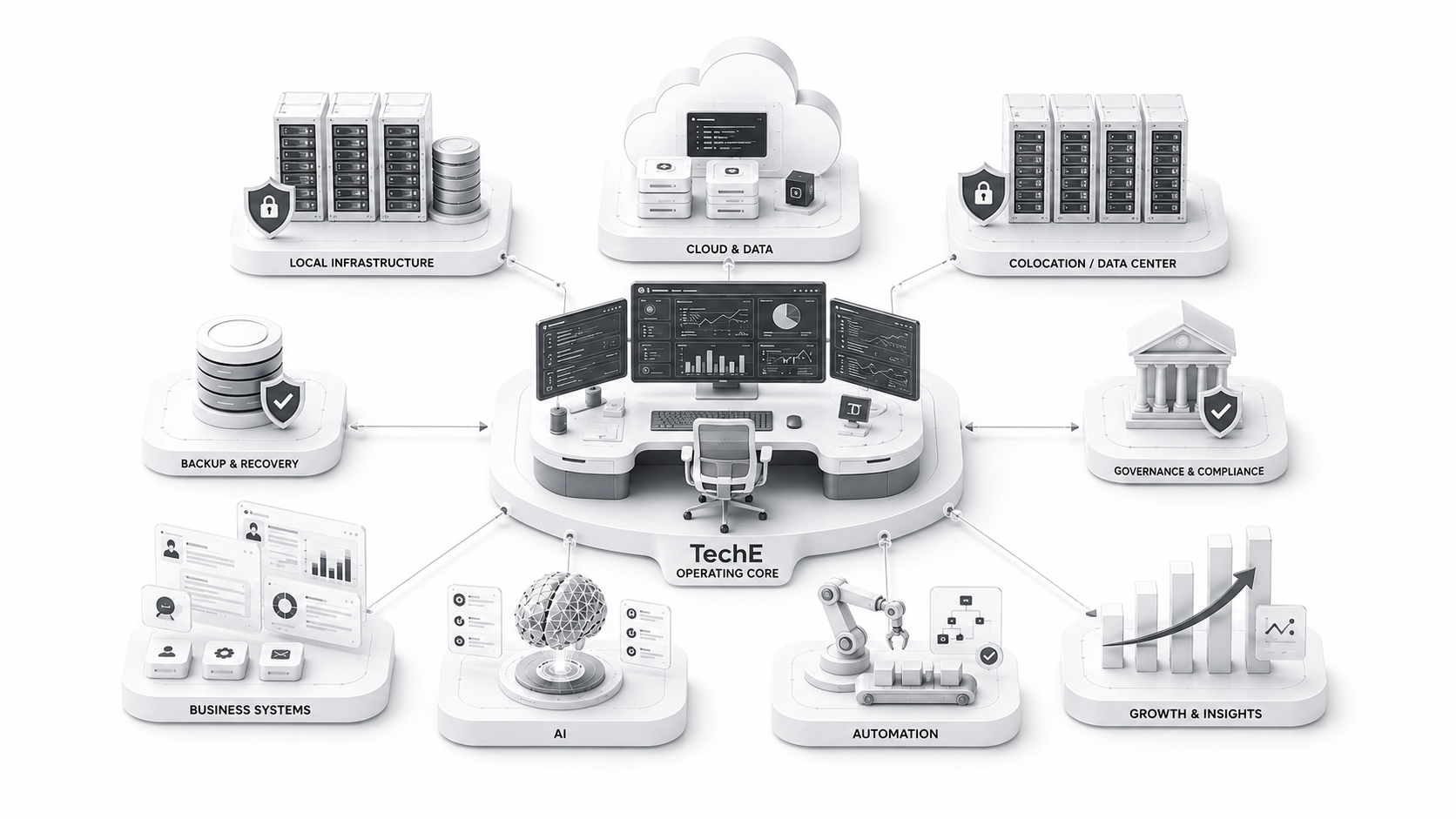
Explore infrastructure approval and evidence

Proof, specifications, validation

See proof before approval—without pretending every asset already exists.

Proof below is shown as a required configuration or approval output unless a live route is separately published.

Proof is shown honestly

Produced during configuration means the output is created for the selected path. Required before approval means validation must be completed before claims or approval. Planned / publication pending is not a live download. Scope-dependent / not included requires explicit commercial and operating scope.

Exact required proof list

Host Unit capacity sheet; pricing anchor sheet; placement diagram; recovery / scope checklist; sample operating evidence pack.

Exact required proof list

Edge Engine / WorkDesk local engine spec sheet; Edge Engine / WorkDesk local engine pictures; Edge Engine / WorkDesk local engine deployment video; Edge Engine / WorkDesk local engine performance tests; Edge Engine / WorkDesk local engine thermal / noise sheet; Edge Engine / WorkDesk local engine validation evidence; Edge Engine / WorkDesk local engine deployment diagram.

Exact required proof list

Converged Hub / Server Unit spec sheet; Converged Hub / Server Unit pictures; Converged Hub / Server Unit deployment video; Converged Hub / Server Unit performance tests; Converged Hub / Server Unit thermal / noise sheet; Converged Hub / Server Unit validation evidence; Converged Hub / Server Unit deployment diagram.

Exact required proof list

high-capacity AI/server Infra Engine spec sheet; high-capacity AI/server Infra Engine pictures; high-capacity AI/server Infra Engine deployment video; high-capacity AI/server Infra Engine GPU / AI performance tests; high-capacity AI/server Infra Engine thermal / noise sheet; high-capacity AI/server Infra Engine validation evidence; high-capacity AI/server Infra Engine deployment diagram.

Exact required proof list

UNO spec sheet; UNO pictures; UNO deployment video; UNO configuration tests; UNO thermal / noise sheet; UNO validation evidence; UNO deployment diagram; UNO site checklist.

Exact required proof list

Local AI desktop spec sheet; local AI benchmark report; deployment video; validation evidence; endpoint-to-infra placement diagram.

Pricing and buying styles
  Anchor
Host Unit $25 per non-GPU Host Unit example anchor
20 Host Units USD 500/mo example non-GPU anchor
40 Host Units $1,000/mo example non-GPU anchor
Converged Hub / Server Unit path priced by configuration; monthly model where scoped
UNO / base path around $1,000/month where scoped
Local AI desktop around USD 500/month where scoped
High-capacity AI/server Infra Engine path scoped
GPU/vRAM separate; 8GB vRAM is Host Unit option only; AI class starts at 24GB SFF professional GPU-class
Buying styles

Procurement decision summary

What is anchored, configured, proved, scoped, and approved.

Anchor versus configured amount

Host Unit examples are starting anchors. Product systems, AI/GPU, storage, recovery, field service, and complete site paths are configured and priced by approved scope.

Buying form

One SKU, built SKU / bundle, phased rollout, HaaS / monthly, owned / on-prem, or hybrid.

Proof before approval

Every item is labelled as produced during configuration, required before approval, planned / publication pending, or scope-dependent / not included.

Scope exclusions

AI/GPU, storage, HA, DR, recovery, retention, failover, restore testing, field service, device support, warranty / RMA, security posture, compliance evidence, and BAA / DPA terms require explicit approved scope.

TechE output

Recommended estate, capacity, product path, placement, operating scope, proof state, priced configuration, BOM, exclusions, and rollout path.

Buyer approval

Commercial priorities, operating expectations, proof review, exclusions, and approved scope before deployment.

Recovery is a path. Evidence makes it visible.

Production, backup, monitoring and change records remain connected.

Decision packets

What the buyer receives before approval

Business recognition and technical authority belong in the same decision path. Neither packet is a substitute for the other.

Business Orderability Packet

A concise owner, procurement and operating decision view.

01

What feels broken

02

Recommended starting point

03

Capability created

04

Placement

05

TechE management scope

06

Anchor versus configured price

07

Buying form

08

Proof state

09

Guardrail and exclusions

10

Add-next path

11

Correct next action

Technical Approval Packe

The architecture, deployment and validation view.

01

Workload

02

Architecture

03

Capacity

04

Role system

05

Placement

06

Bill of materials

07

Site readiness

08

Power, thermal and network

09

Recovery

10

Proof and evidence

11

Exclusions

12

Approval

Existing customers may enter directly at the current estate stage and add-next decision. They are not forced to restart the entire buyer journey.

Decision packets

What the buyer receives before approval

Business recognition and technical authority belong in the same decision path. Neither packet is a substitute for the other.

Business Orderability Packet

A concise owner, procurement and operating decision view.

01

What feels broken

02

Recommended starting point

03

Capability created

04

Placement

05

TechE management scope

06

Anchor versus configured price

07

Buying form

08

Proof state

09

Guardrail and exclusions

10

Add-next path

11

Correct next action

Technical Approval Packet

The architecture, deployment and validation view.

01

Workload

02

Architecture

03

Capacity

04

Role system

05

Placement

06

Bill of materials

07

Site readiness

08

Power, thermal and network

09

Recovery

10

Proof and evidence

11

Exclusions

12

Approval

Existing customers may enter directly at the current estate stage and add-next decision. They are not forced to restart the entire buyer journey.

How to proceed

Practical Questions Before You Start

Q.1 What is TechE?

TechE is a managed SMB technology ecosystem. It connects workspace, apps, workflows, AI, hosting, recovery, support, and scale into one operating path.

Q.2 Where should my business start?

Start with the business need: team workspaces, business applications and workflows, AI, infrastructure, recovery or a wider technology estate. TechE scopes the right entry path around what you need.

Q.3 Do we have to replace everything?

TechE can keep useful existing tools, clean up what is broken, and replace only what no longer fits the operating model.

No. TechE can keep, replace, integrate, defer, localize, self-host or right-host components based on the business case.

Q.4 Is TechE software, cloud, MSP, or hardware?

TechE is a managed operating ecosystem, not one category. It can include workspace, apps, AI, hosting, infrastructure, service, and hardware where justified.

Q.5 Do we need to buy servers?

Many businesses can start with WorkDesk and managed Host Units. Physical systems are added only when locality, recovery, performance, control, ownership, or site operations justify them.

Yes. WorkDesk and the standard managed path start without requiring client-owned infrastructure first.

Q.6 What is WorkDesk?

WorkDesk brings business applications, productivity tools and workflows into an AI-powered work environment, with integrated chat and dedicated team workspaces.

Q.7 How does TechE handle AI and private data?

TechE separates casual AI use from approved business AI paths. Private AI/RAG, source-backed answers, data boundaries, model routing, and workload control are added where justified.

Yes, where the data, privacy, workload and operating case justify a private/local AI path.

Q.8 How is pricing decided?

Pricing starts with the selected package. Service packs are scoped around users, devices, apps, data, AI, migration, recovery, infrastructure, support, and scale.

Yes. The standard managed infrastructure required for the selected package scope is included. Deeper private, dedicated, local, regional, GPU, HA/DR or hardware paths are scoped when needed.

Q.9 How long does deployment take?

It depends on the starting path. WorkDesk and hosted paths can start in stages. Deeper infra, migration, site systems, or hardware require estate review and sequencing.

Q.10 What proof or evidence do we get?

Where scoped, TechE provides handoff notes, recovery posture, access paths, support boundaries, lifecycle records, architecture references, and deployment evidence.

Q.11 Can TechE work with our current vendors or IT person?

Yes. TechE can work alongside existing vendors or internal support. The goal is to clarify ownership, reduce gaps, and create a managed operating path.

Q.12 Who is not a good fit for TechE?

TechE fits best when the buyer wants a managed operating path, not a one-time gadget, unmanaged tools, or more patchwork with no operating responsibility.

You do not need to know every technical answer before starting.

TechE maps the business, identifies the right entry path, and scopes the system around what is actually needed.

Can TechE support on-premise and colo?

Yes. Sovereign Infra covers managed, private, regional, on-premise, colocation and hybrid placement paths.

Does TechE guarantee compliance?

TechE provides compliance-ready foundations and evidence paths. Formal compliance, certification and audit outcomes depend on the client environment and operating model.

About Biz10X! & Tech10X!
Biz10X! & Tech10X!

Stop patching tools. Start compounding capability.

For owners, CTOs, operators, builders and partners moving beyond patchwork technology. The network focuses on practical business transformation, AI, systems, infrastructure, recovery and operating discipline.

Who it is for

Owners, CTOs, operators, builders and partners.

Biz10X! & Tech10X! is the interest and learning network around practical SMB transformation — not a substitute for the commercial path.

Business Transformation

Practical ways to reduce patchwork and build stronger operating systems.

AI for SMBs

Approved AI, private AI, RAG and useful automation without hype.

Deep Tech Systems

Infrastructure, edge, devices, recovery and real-world technology operations.

WorkDesk & Systems

Daily work, files, apps, workflows and governed business memory.

Sovereign Infra

Capacity, placement, private/local infrastructure and hardware when justified.

Operations & Evidence

Monitoring, backup, restore, support and evidence-ready operations.

Interested, but not ready to buy?

Join the Biz10X! & Tech10X! interest network and tell us which tracks matter to you.